

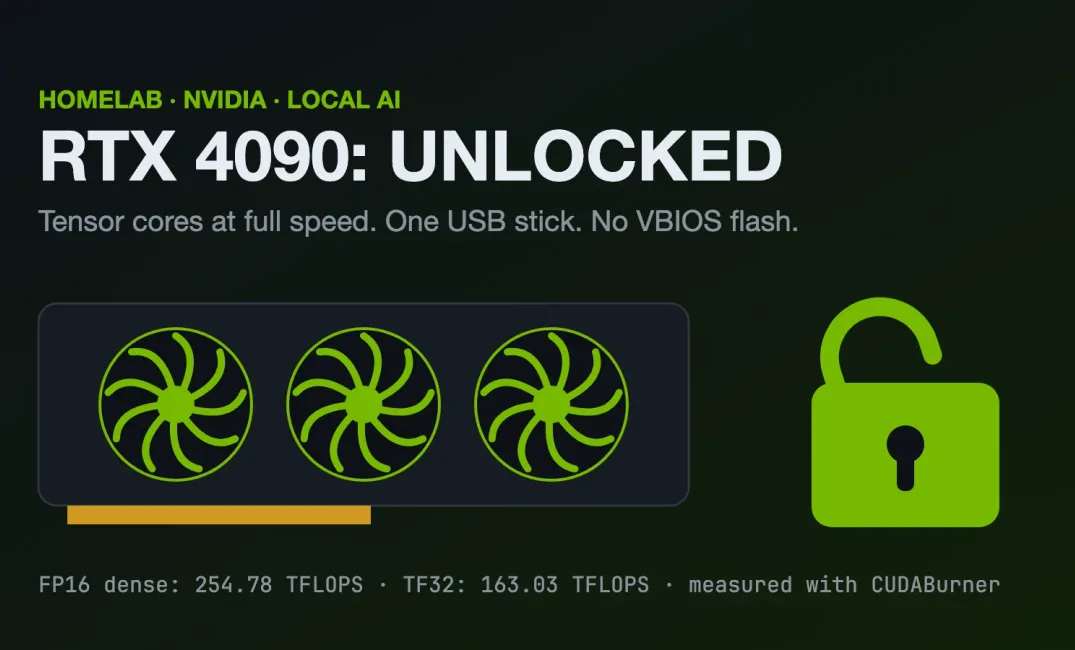
So... apparently my RTX 4090 has been running its AI maths at half speed for three years and nobody told me.. 😅

The person who turned this from mining-card research into a real, working tensor-core unlock for GeForce cards is Zagitta, whose gpu-unlock was the first public release that flipped these registers on RTX 30 series cards. Zagitta is refreshingly honest about the lineage, saying on Hacker News that "the exploits... aren't my ideas by any means." The underlying exploit, a stack overflow in NVIDIA's SEC2 Booter firmware, traces back to the cryptomining card unlock scene (the CMP 170HX work and the V67/PLM technique) and was later written up formally in a 2026 paper by Jon Pry. The RTX 40 (gpu-unlock-ada) and RTX 20 (turing-unlock) projects came after, porting the same idea to other architectures.
Zagitta was first to prove the gaming tensor cores were throttled by a flippable register and first to ship the switch. Everyone since, including the USB tool I used, is building on that.
The tool I used (nv-uefi-unlocker) is a UEFI port that came later in the story.

When I read about it, it's for sure that I had to try it on my gaming rig! The results was nothing short of amazing... my vLLM benchmark went from 2,087 to 4,016 tokens per second. Same card, same model, same command. Nearly double +100%.
First, a moment of appreciation for 2023 me
I bought this gaming PC back in November 2023. RTX 4090, 64GB of DDR5, Ryzen 9 7900X3D to replace my Intel 9th gen i9-9900K w RTX2070 and 32GB of DDR4. It cost me a huge hole in my wallet as it was almost S$9,000.. 😅
Then the AI crunch came in 2026.. GPU prices went up.. RAM prices went up.. Everything that can hold a model in memory went up. If I had to buy the same specs today, my wallet would file a police report. 😝
I didn't plan this. I just got lucky with the timing. But it means I have a 24GB card and enough RAM sitting at home to experiment with local LLMs and image generation without paying too much for frontier models. And now that same card got a free speed bump. I wouldn't complain 😎
What is this unlock?
Your RTX card has tensor cores. These are the bits of the GPU that do matrix maths very fast in lower precision like FP16 and BF16, which is what most AI inference and training uses.
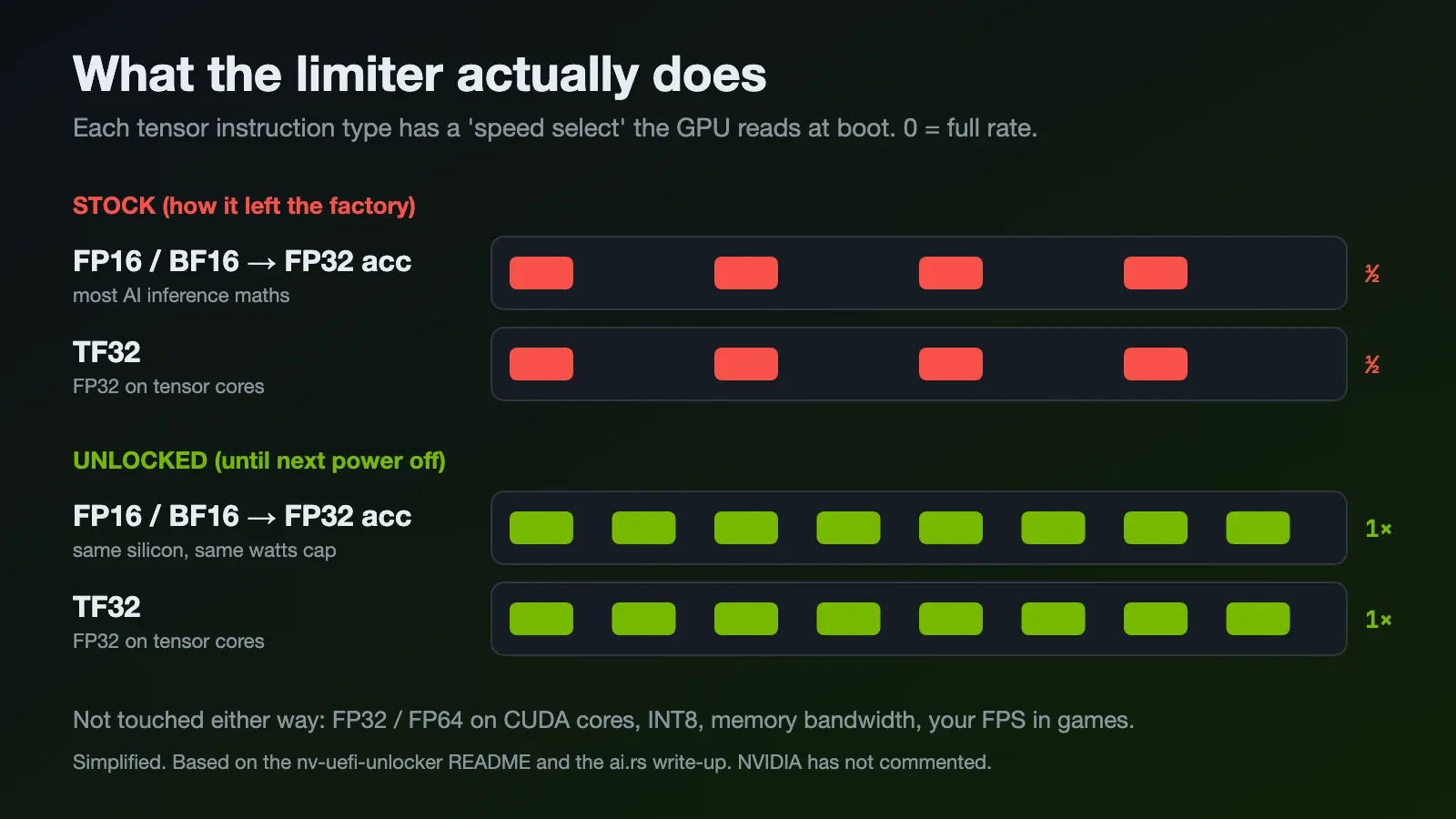
From what the researchers found, each type of tensor instruction has a "speed select" value that the GPU reads from its fuses when it boots. Zero means full rate. On consumer cards, some of them are not zero:
- FP16 and BF16 with FP32 accumulate: shipped at half rate
- TF32 (FP32 running on tensor cores): shipped at half rate
- FP32 and FP64 on normal CUDA cores, INT8, FP16 with FP16 accumulate: already full rate
So the silicon can do it. It is just told not to.
nv-uefi-unlocker is a small UEFI program you boot from a FAT32 USB stick before Windows or Linux starts. It uses a bug in one of NVIDIA's own signed boot-time firmware blobs to open a permission gate on the card, then writes the speed select values back to zero. After that it hands over to your normal bootloader and the driver loads like nothing happened.
Two things I like about this design:
- Nothing is flashed. Power off the PC and the card is back to stock.
- It supports RTX 20, 30 and 40 series, desktops and laptops. GTX 16 is "theoretically compatible". RTX 50 is not supported, and ai.rs has a good write-up on why the trick does not work on Blackwell (yet).
Tom's Hardware covered it too, and there is a long Linus Tech Tips forum thread if you want to read other people's results.
How it actually works: a quick UEFI detour
This part is the clever bit, and it answers two questions I had:
- why a USB stick?
- and why does it undo itself when I power off?
UEFI is the firmware that runs when you press the power button, before any operating system. One of its jobs is DXE, the Driver eXecution Environment, where it loads the drivers for each device so it can talk to your GPU, your NVMe and your USB ports. At that moment the GPU's own firmware has finished starting up, but the NVIDIA driver does not exist yet. Windows hasn't loaded.
That tiny gap is the whole trick. It is the only moment where the card's speed-rate selectors are reachable and nothing is guarding them yet. The tool is a UEFI application that the firmware loads during DXE. It opens the permission gate, writes the speed selects back to full rate, and then chain-loads your normal bootloader, which is just a fancy way of saying it hands control to bootmgfw.efi (Windows) or GRUB (Linux) and steps aside. So the unlock and your normal boot are a single power-on. You don't boot into some separate tool and then reboot.
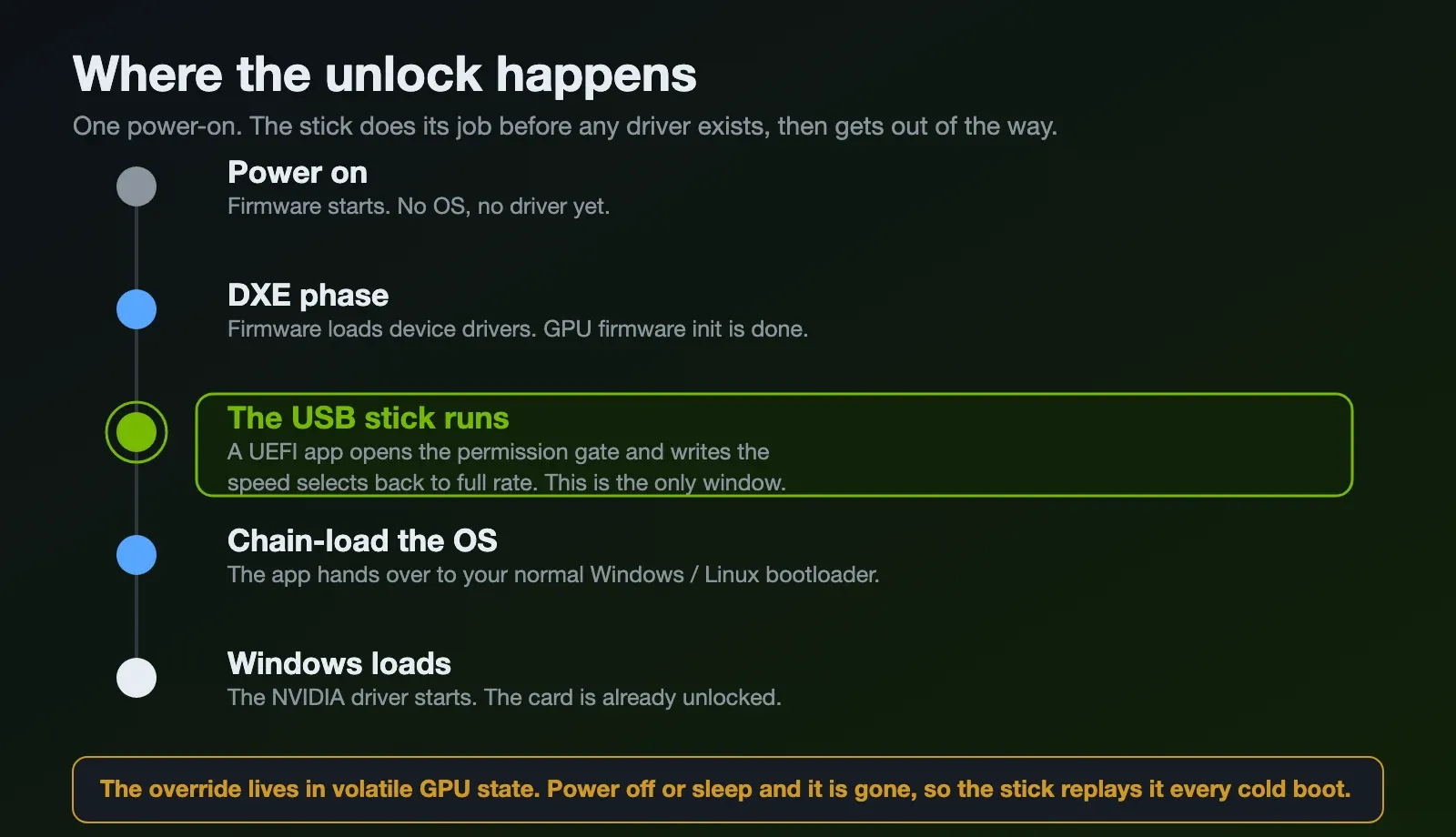
And this is why it is not permanent. The override lives in volatile state on the GPU, on what the docs call the always-on island. It is inherited by the OS, but it is only held until the card loses power. Shut down or sleep (S3/S4) and it is gone, back to stock. That is why the stick has to replay it on every cold boot, and also why I keep saying the whole thing is reversible: you are not changing anything that survives a power cycle. No VBIOS flash, no fuses burned.
Why were the tensor cores locked?
NVIDIA has not said anything, so nobody outside NVIDIA actually knows.
The popular theory online is about product segmentation. If a $1,600 gaming card does the same FP16 throughput as a workstation or datacenter card that costs many times more, fewer people buy the expensive one. The ai.rs article points out that NVIDIA's own RTX 5090 whitepaper lists FP16 with FP32 accumulate at exactly half the FP16 accumulate figure, so the half rate looks like a documented product decision and not a bug.
But here is the detail that makes this seems plausible, and it is the thing that annoys me most..
Your gaming card and the workstation card are often the same chip
The RTX 3090 and the professional RTX A6000 are both built on the same GA102 die. The RTX 4090 and the RTX 6000 Ada are both the same AD102 die. Same transistors, same tensor cores, made on the same production line. The workstation card runs the FP16, BF16 and TF32 tensor paths at full rate. The gaming card, on the same silicon, runs them at half rate.
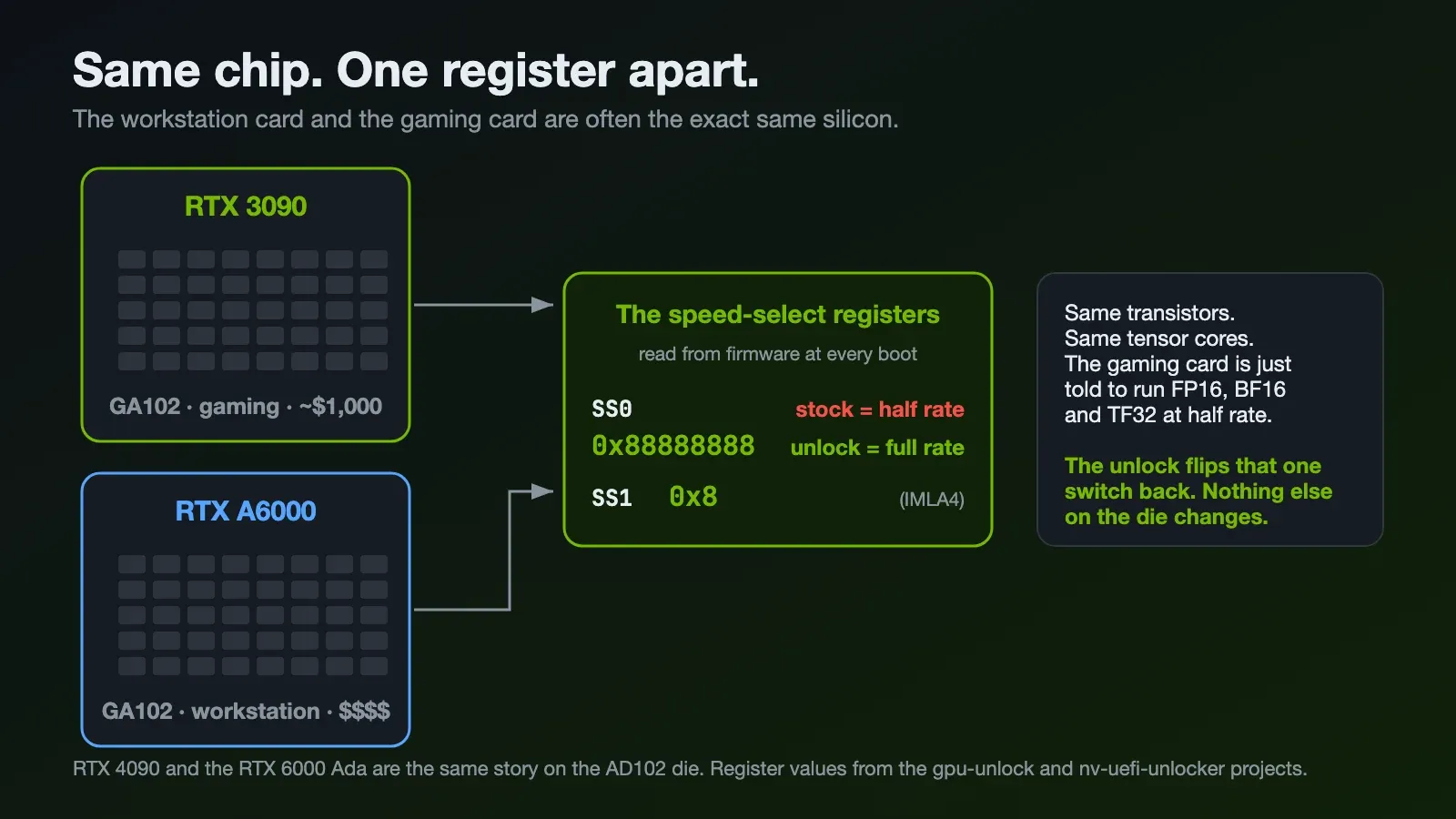
This is not a new trick. NVIDIA has segmented its market with firmware and drivers since the Quadro days: take one chip, use software to decide which features each price tier gets. The tensor half-rate cap is the modern version of that. The silicon can do it. A register is telling it not to.
The actual switch: two registers called SS0 and SS1
So if it is not burned into the silicon, where does the limit live? In a pair of "speed select" registers, SS0 and SS1, that the GPU reads from its firmware every time it boots.
On a stock gaming card these hold the half-rate values. The unlock writes new values:
SS0 = 0x88888888— this selects the full BF16 / FP16 / TF32 issue rate. Each of those8nibbles is one instruction type being told "run at full speed".SS1 = 0x8— the matching value for the 4-bit path the projects call IMLA4.
That is genuinely the whole thing. Two register writes. Everything else, the USB stick, the firmware exploit, the careful boot timing, exists purely to get write access to those two registers for a split second. The registers are protected by a privilege gate (a Privilege Level Mask), and the only way to open that gate is to run code inside the GPU's secure microcontroller before any driver has locked things down. That is what the exploit does.
Is this safe? And why not just flash the BIOS?
This was the question I actually cared about before running anything on a card I can't easily replace at today's prices. The short version: it is about as low-risk as a GPU mod gets, and the reason is the same reason it has to be done from a USB stick.
Why it is safe. The unlock only changes the instruction issue rate. It does not touch the power limit, the thermal limit or the clocks. All of NVIDIA's normal throttling and protection stays exactly as it was. The Zagitta project puts it plainly: outputs are bit-identical before and after, only the speed changes. Your model gives the same answers, just sooner. Nobody in the community reports has bricked a card this way, and the developers rate the odds of damage as very low because nothing that protects the card is being disabled.
Why it is easy to revert. Nothing is written to permanent storage. The new register values live in volatile state that the card forgets the moment it loses power. Shut down, and you are back to a 100% stock card with zero trace. There is no "undo" to run, no backup VBIOS to keep. Power cycling is the undo. That is also why you have to re-apply it on every cold boot.
Which leads to the question everyone asks: if it is just two register values, why not make it permanent by flashing the BIOS or patching the driver? I looked into this, and every route except the boot-time one is either impossible or a worse idea:
- Flash the VBIOS? The GPU's firmware is signed. A modified VBIOS fails NVIDIA's signature check, and the card won't boot it. You would also be writing to the card's flash, which is the one way to actually brick it. The whole appeal here is that nothing is flashed.
- Patch the driver? Two problems. By the time the NVIDIA driver is running, it is too late: the privilege gate that guards these registers is already closed, so the driver cannot write them even if you modified it. And a patched driver breaks on every driver update, which is exactly the maintenance pain these projects were built to avoid.
- Just write the registers from a script after Windows boots? Same wall. Once the driver has claimed the card, the gate is shut. The projects note that loading the unlock after boot simply does nothing to a card the driver already owns.
- Burn new fuses? Fuses are one-time and permanent. That is the actual brick-your-card-forever option, and it is pointless when a volatile register write does the same job reversibly.
So the USB stick is not a clumsy workaround. It is the one and only window where these registers are reachable: after the GPU's firmware has started but before any driver locks the gate. Run there, write the two values, hand off to Windows. That design is also what makes it safe, because the thing that makes it temporary is the same thing that makes it harmless.
How I unlocked my RTX 4090
The steps on Windows were shorter than I expected.
1. Build the USB stick. Run the script from the repo. It detects the card, pulls the firmware pieces it needs from the NVIDIA driver already installed on your machine, and verifies the hashes.
PS E:\Temp\nv-unlock> .\make-usbroot.ps1
[localhost] 10de:2684 -> ad102 (NVIDIA GeForce RTX 4090)
[localhost] building for: ad102
[local] using DriverStore ... (DriverVer 10/27/2026, 32.0.16.2114)
[extract] GSP firmware images (gsp_ga10x + gsp_tu10x)
[extract] SEC2 scrubber (shared: ad102/ga102)
[extract] AD102 booter / GSP boot
[generate] V67 AD102 four-write payload
  wrote .\usbroot\v67-ad102-four-plm.bin (64000 bytes, SHA-256 verified)

DONE (ad102). The stick root must receive the layout; for example (X: = the FAT32 stick):
  xcopy "E:\Temp\nv-unlock\usbroot\*" X:\ /E /H /Y
2. Copy it to a FAT32 stick with the xcopy command it prints. Keep the EFI/BOOT/BOOTX64.EFI path as it is.
3. Deal with Secure Boot. The diagnostic tool warned me that Secure Boot was ON and the EFI stick would not load like that. I disabled it. This one deserves its own section, below, because it has real consequences, and I work in security so I can't just wave it away.
4. Boot from the stick using the one-time boot menu, confirm at the version screen, and it continues into Windows by itself.
5. Verify. The repo ships a read-only diagnostic called ssdiag. The full output is a few hundred lines of registers, so here are the lines that matter.
Before:
PLATFORM: Secure Boot = ON
0x823xxx amp/ada/gb PLM = 0xffffff8f (closed (stock))
0x823xxx amp/ada/gb SS0 = 0x24312034 [r4 r3 . r2 r1 r3 r4 r2]
0x823xxx amp/ada/gb SS1 = 0x00000005 [r5]
VERDICT [ada]: NOT_UNLOCKED
After:
PLATFORM: Secure Boot = OFF
0x823xxx amp/ada/gb PLM = 0xffffffff (OPEN)
0x823xxx amp/ada/gb SS0 = 0x88888888 [0* 0* 0* 0* 0* 0* 0* 0*]
0x823xxx amp/ada/gb SS1 = 0x00000008 [0*]
0x823xxx amp/ada/gb READOUT_1 = 0x00000000 [full speed]
VERDICT [ada]: UNLOCKED (override values live)
CANARY: intact + SS live - no reset, nothing rewrote the state after handoff
[full speed]. Very satisfying to read.
The prerequisite nobody puts on the box: Secure Boot off
Notice the Secure Boot = ON in the "before" and OFF in the "after". That is not a detail, that is the price of admission, and the FAQ is clear about it: the tool "is not a way around Secure Boot."
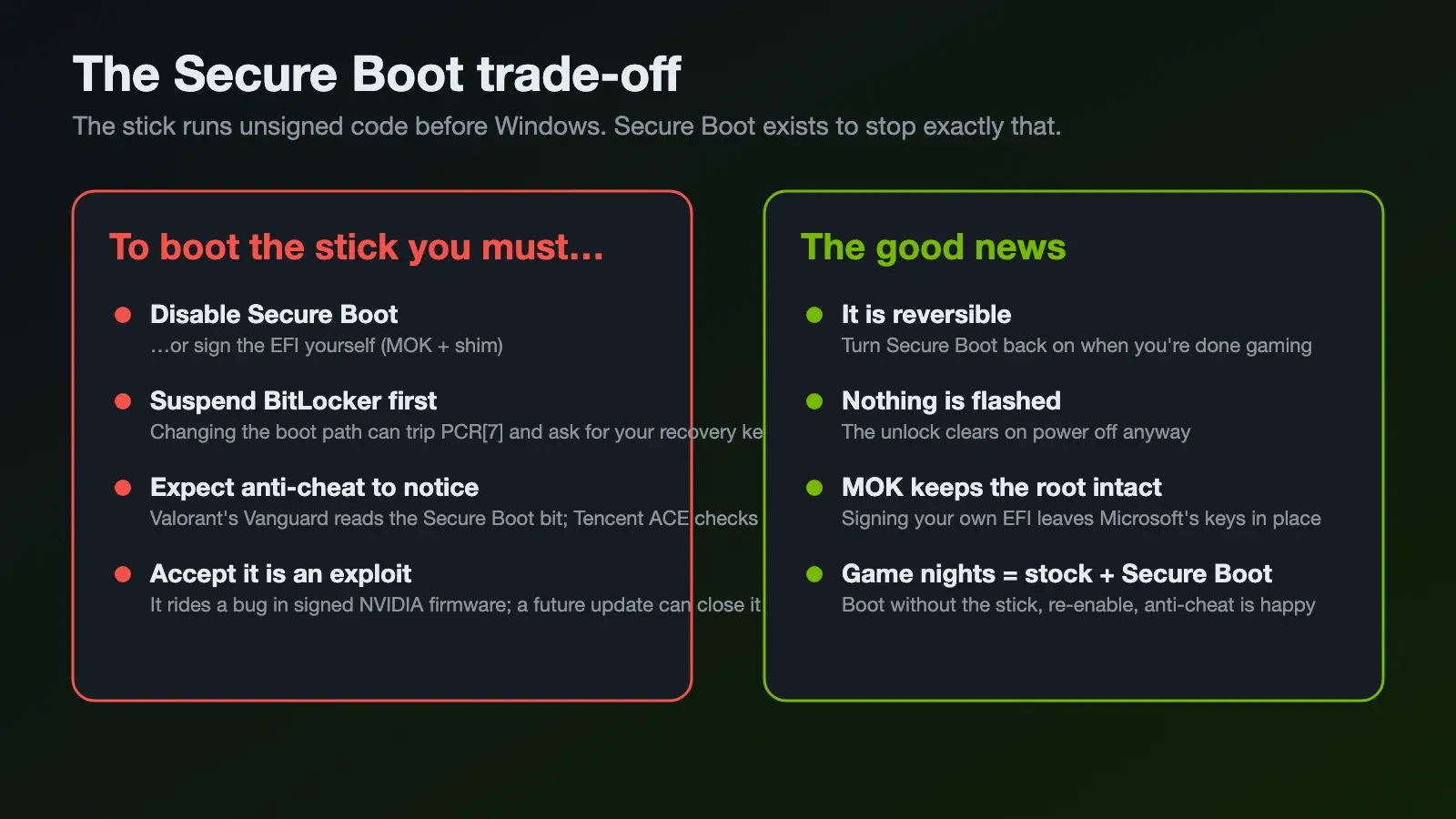
Secure Boot exists to make sure only code signed by a trusted key runs before your OS. The unlocker is unsigned code that runs before your OS. So by design, Secure Boot blocks it. You have two honest options:
- Turn Secure Boot off. What I did. One setting in the BIOS, and the lazy route.
- Sign the EFI yourself. The proper route. You enrol your own key through MOK and shim, so Microsoft's keys stay in place and only your signed loader is trusted. More work, and you redo the signing every time the tool updates because changing a single byte breaks the signature.
The implications are bigger than the GPU
Turning Secure Boot off is not free, and this is the part people skip:
- Anti-cheat will notice. This is the big one for a gaming PC. Riot's Vanguard (Valorant, League) reads the Secure Boot state bit, and Tencent's ACE anti-cheat validates the TPM and PCR chain. If you play anything that uses kernel anti-cheat, it may refuse to launch with Secure Boot off. The FAQ is honest that nobody has properly tested every anti-cheat, so assume the worst.
- BitLocker may demand your recovery key. Changing the boot path or Secure Boot state changes the measurements BitLocker trusts (the PCRs). The FAQ recommends suspending BitLocker once before you start (
Suspend-BitLocker -RebootCount 1) and keeping your recovery key handy. I learned this the annoying way on a different machine years ago. Don't skip it. - Windows 11 baseline. Secure Boot is part of the Windows 11 security baseline, so leaving it off permanently is not what Microsoft wants you doing. For a homelab box, fine. For anything with work data on it, think harder.
The saving grace is that it is all reversible. The unlock clears on power off anyway, so my routine is simple: when I want the GPU unlocked for AI, Secure Boot stays off and I boot the stick. When I want to play a competitive game, I shut down, turn Secure Boot back on and boot normally. Stock card, happy anti-cheat. The two modes don't have to fight.
When my Bitdefender threw a tantrum
The moment I downloaded the diagnostic tool (ssdiag), Bitdefender flagged and quarantined it. If you use Bitdefender, Defender, Emsisoft, GData or a few others, you will probably see the same, and the FAQ has a whole section on it.
Here is what is actually going on, because "my antivirus says trojan" is exactly the moment you should slow down and not just click "allow".
The flagged file is ssdiag-x86_64-windows-0.7.1.exe, the read-only diagnostic I used to verify the unlock. It is not part of the unlock itself. The unlock is the USB stick; ssdiag is an optional tool that reads the card's registers so you can confirm the state changed. To read those registers on Windows there is no blessed user-mode path, so it carries a signed kernel driver (pmxdrv.sys) embedded inside the exe, loads it to peek at the hardware, and removes it when it exits.
An unsigned program with a whole kernel driver baked into it is, to an antivirus engine, the exact shape of malware. So a bunch of engines throw generic machine-learning names at it: Microsoft calls it Trojan:Script/Wacatac.H!ml, Bitdefender Trojan.GenericKD.82039403, and so on. The FAQ calls this "the textbook false-positive shape", and the tell is that the names are all generic and heuristic (!ml, Generic) rather than a specific known malware family.
That does not mean you blindly trust it. What I did, and what the FAQ recommends:
- Verify the hashes. Check the downloaded zip against GitHub's published digest, then each extracted file against the included
SHA256SUMS.txt.ssdiagalso self-checks a pinned hash of its own driver at runtime. If the hashes match the official release, you have the file the author published and not something tampered with in transit. - Skip it entirely if you want. The actual unlock does not need
ssdiag. It is only for verification. On Linux there is a driver-free Python reader (diag-unlock.py), and you can also confirm the unlock from GEMM benchmark numbers alone, which is basically what CUDABurner did for me. - Then, and only then, add an exclusion. Once the hash checks out, I added that one file to Bitdefender's exclusions so it would run. Not a blanket "turn off antivirus", just that file.
One more thing worth knowing: loading that kernel driver leaves a permanent record in Windows (an SCM event 7045), so on a managed or work machine your IT team's EDR will see it and may ask you questions. On my own homelab box I don't care. On a work laptop I would not run it at all.
As for the other file you might see, assets-x86_64-windows.exe: that is part of the build pipeline that assembles the stick payload, not the thing that trips Bitdefender in my case. The one that actually gets flagged is ssdiag.
RTX 4090 benchmark: stock vs unlocked

I used CUDABurner, a small open source tool that measures raw throughput per precision in TFLOPS (and TOPS for INT8).
Small confession. I was so excited to boot the stick that I forgot to run the benchmark on the stock card first.. 🤦 Luckily the unlock clears on power off, so I shut down, booted without the stick and ran it again. Same card, same driver 621.14.
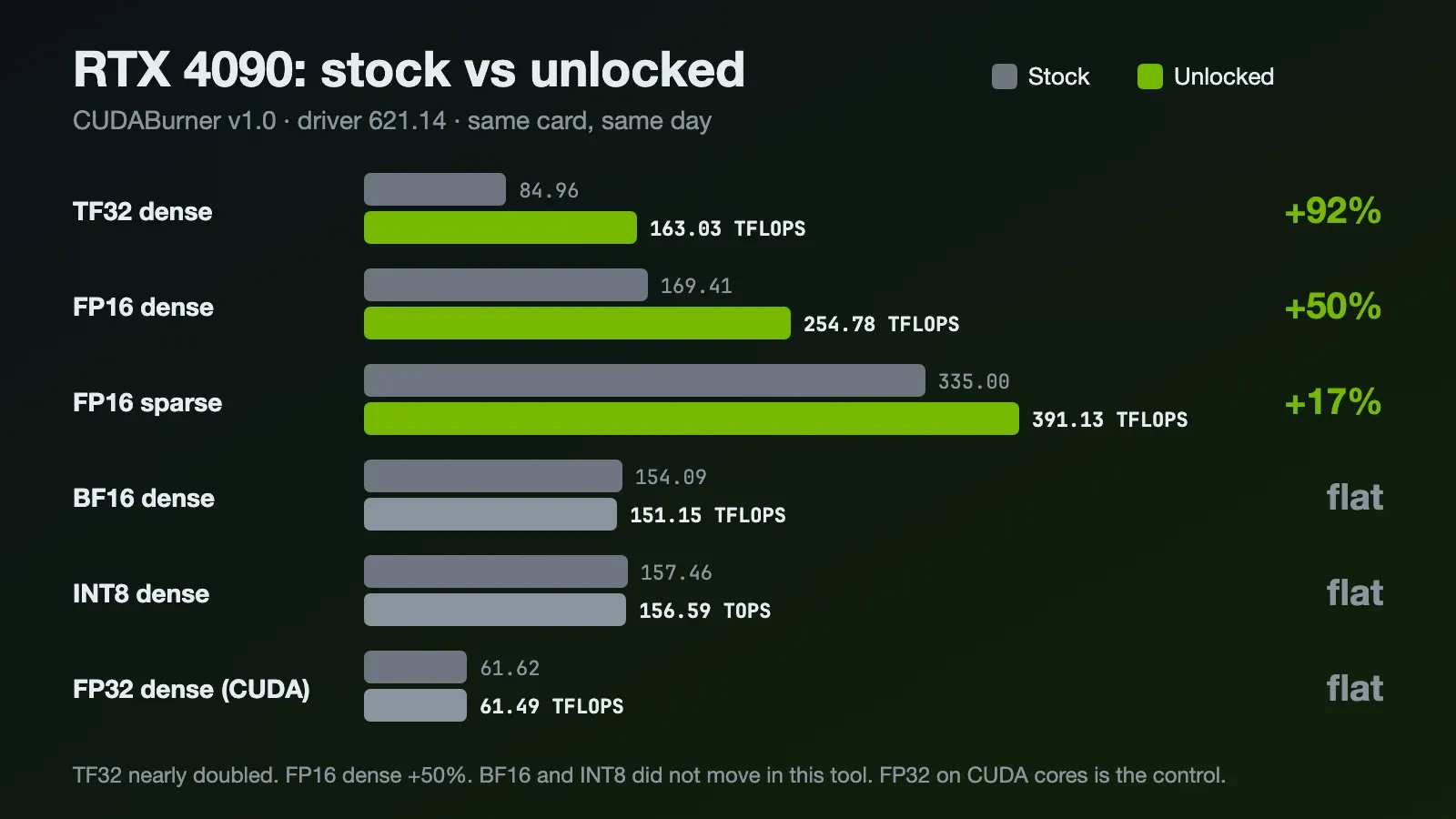
| Precision | Stock | Unlocked | Change |
|---|---|---|---|
| TF32 dense | 84.96 TFLOPS | 163.03 TFLOPS | +92% |
| FP16 dense | 169.41 TFLOPS | 254.78 TFLOPS | +50% |
| FP16 sparse | 335.00 TFLOPS | 391.13 TFLOPS | +17% |
| BF16 dense | 154.09 TFLOPS | 151.15 TFLOPS | flat |
| INT8 dense | 157.46 TOPS | 156.59 TOPS | flat |
| INT8 sparse | 1319.33 TOPS | 1299.32 TOPS | flat |
| FP32 dense (CUDA cores) | 61.62 TFLOPS | 61.49 TFLOPS | flat |
| FP64 dense (CUDA cores) | 1.20 TFLOPS | 1.19 TFLOPS | flat |
Raw output of the unlocked run:
============================= CUDABurner v1.0 ==============================
- Target GPU : [0] NVIDIA GeForce RTX 4090
- Driver Ver : 621.14
----------------------------------------------------------------------------
[Benchmark Results] (Completed)
Precision Mode    Performance         Engine / Notes
----------------------------------------------------------------------------
FP64      Dense   1.19 TFLOPS*        CUDA Core (Native)
FP32      Dense   61.49 TFLOPS*       CUDA Core (TC Disabled)
TF32      Dense   163.03 TFLOPS*      Tensor Core (Default FP32)
FP16      Dense   254.78 TFLOPS*      Tensor Core
FP16      Sparse  391.13 TFLOPS*      Sparse Tensor Core
BF16      Dense   151.15 TFLOPS*      Tensor Core
INT8      Dense   156.59 TOPS*        Tensor Core
INT8      Sparse  1299.32 TOPS*       Sparse Tensor Core
----------------------------------------------------------------------------
* Performance may be limited by throttling.
What I read from this:
- TF32 almost doubled. 84.96 to 163.03 TFLOPS. This is the cleanest "half rate" evidence on my card, and it lines up with another 4090 owner in the nv-uefi-unlocker community table who went from 79.4 to 148.5.
- FP16 dense went up 50%. Not the full 2x. The Linux unlock project quoted by ai.rs saw the same pattern on a 4090: the raw FP16 issue rate doubles (165.6 to 331.6 TFLOPS), but real matrix workloads gain less because they also wait on memory.
- FP32, FP64 and INT8 did not move. Good. They were never limited, so they work as my control group. It tells me the gains are from the unlock and not from a lucky run.
- BF16 did not move either, and I can't explain it. Every source says BF16 is one of the limited paths, and my vLLM result below says the same. But CUDABurner shows 154.09 before and 151.15 after. My guess is it has to do with how this tool runs its BF16 test, but that is a guess. I'm leaving the number here as measured.
Power draw, heat and other side effects
This was my main worry. Is my 4090 going to melt its favourite connector?
As far as I can tell the unlock only changes the tensor issue rate. The power limit of my card still reads 450 W in CUDABurner and nothing here raises it. What changes is that the tensor cores are doing up to twice the work per second, so a workload that used to sit below the power limit can now pull more watts while it runs. It should also finish sooner.
What other people measured:
- An RTX 3090 Ti owner reported HWiNFO showing nothing running hotter after the unlock, and an INT8 workflow finishing faster at the same 418.5 W.
- The projects themselves say "use at your own risk" and warn about heavy power draw under full-rate tensor load. If you combine this with an overclocking tool, you can go past the stock power and thermal envelope.
- Some cards show a black screen or frozen frame for a moment during the handoff. Some laptops and headless setups needed extra settings.
I haven't logged my own power and temperature under load yet. The CUDABurner vitals in my screenshot were captured after the run finished, so the 37 W and 56°C are idle numbers and prove nothing. Same story for the stock run (36 W, 55°C, also idle). Proper load numbers are still on my to-do list.
Now the part the security person in me has to say:
- Secure Boot. Off, or you sign the EFI yourself. See the dedicated section above for why that matters for anti-cheat and BitLocker.
- It is an exploit. The whole thing works because of a bug in a signed NVIDIA firmware blob. NVIDIA can fix that in a future driver or firmware and the party is over.
- Your antivirus will probably flag the diagnostic. It is a false positive with a real cause. See the Bitdefender section above for why, and how to verify before you trust it.
- Warranty and anti-cheat. Nobody has a clear answer. Since it resets on power off, I just don't boot the stick on game nights.
- It does not survive power off or sleep. A reboot may keep it, a shutdown will not. Run
ssdiagif you're not sure.
Does this make local LLMs faster? vLLM, ComfyUI and friends
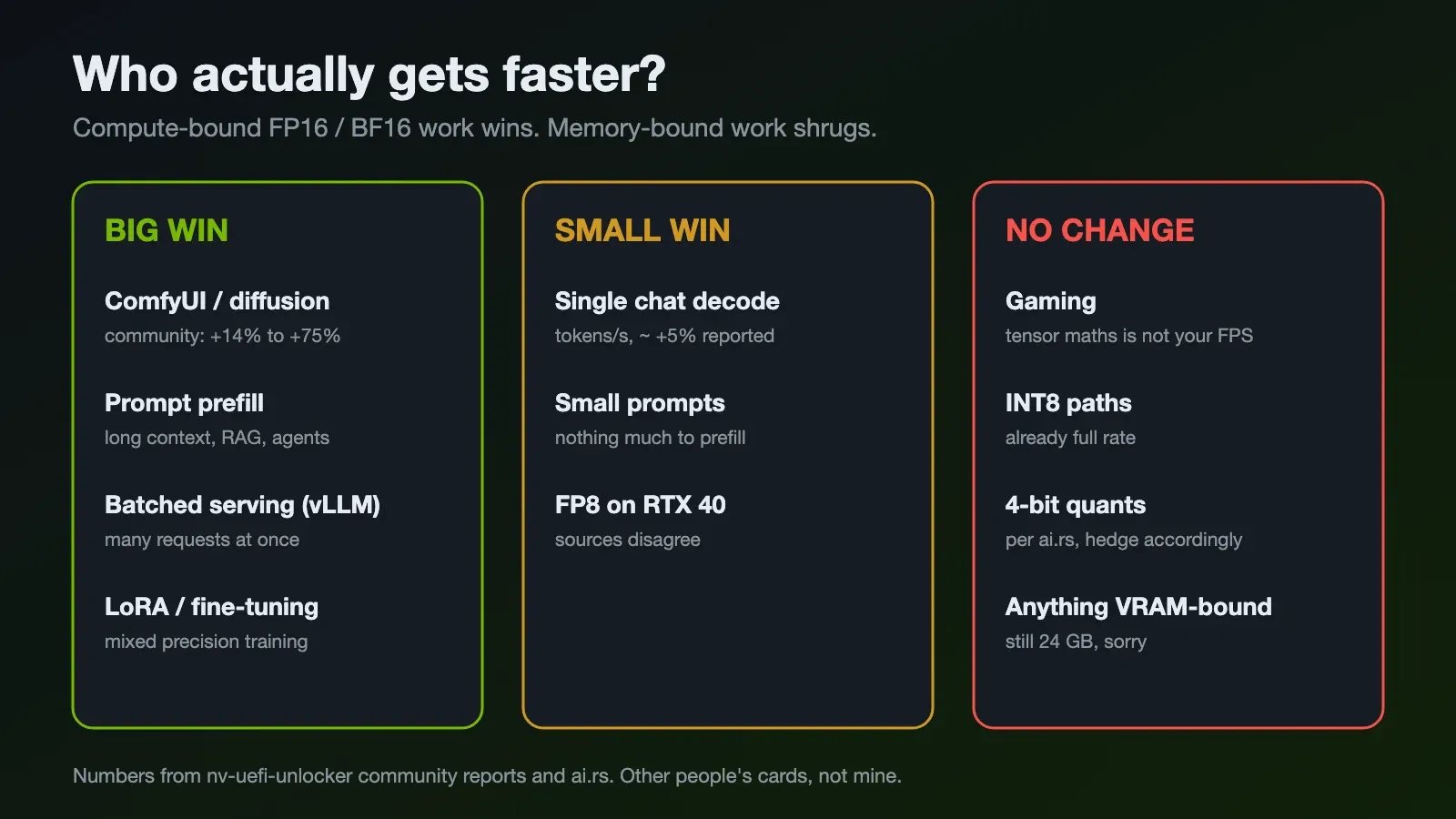
This is the reason I care. The honest answer is: it depends on whether your workload is waiting on compute or waiting on memory.
vLLM benchmark: stock vs unlocked
I ran vLLM's built-in throughput benchmark with Qwen3.5-9B, before and after:
vllm bench throughput \
  --model Qwen/Qwen3.5-9B \
  --dataset-name random \
  --random-input-len 4096 \
  --random-output-len 128 \
  --num-prompts 50 \
  --max-model-len 8192 \
  --max-num-seqs 4 \
  --gpu-memory-utilization 0.90 \
  --language-model-only
Stock:
Throughput: 0.49 requests/s, 2086.86 total tokens/s, 63.24 output tokens/s
Total num prompt tokens:  204800
Total num output tokens:  6400
Unlocked:
Throughput: 0.95 requests/s, 4016.20 total tokens/s, 121.70 output tokens/s
Total num prompt tokens:  204800
Total num output tokens:  6400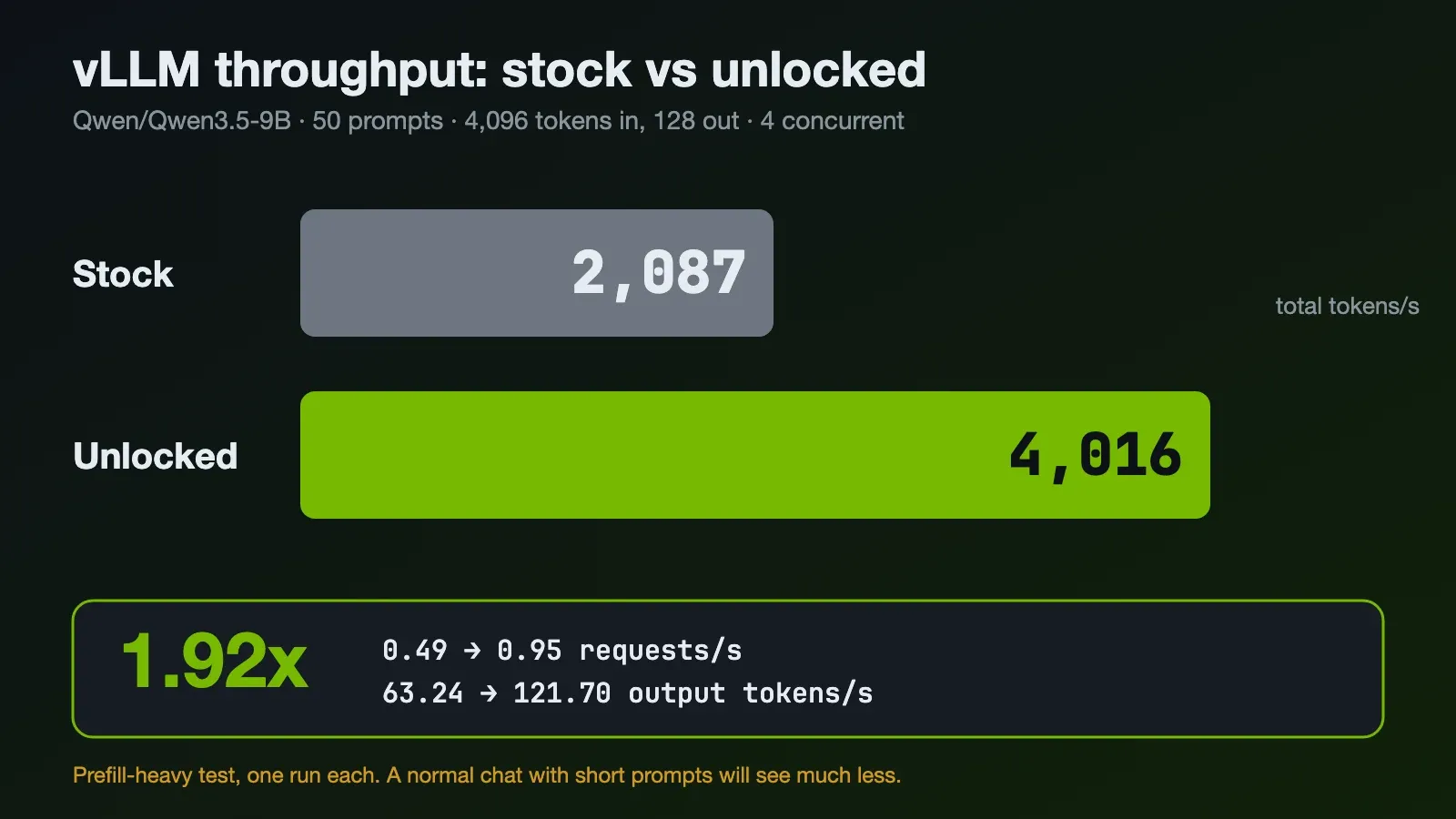
| Metric | Stock | Unlocked | Change |
|---|---|---|---|
| Requests/s | 0.49 | 0.95 | +94% |
| Total tokens/s | 2,086.86 | 4,016.20 | +92% |
| Output tokens/s | 63.24 | 121.70 | +92% |
1.92x. On a three year old card. From a USB stick.
This is a lot more than the +19% prefill number in the nv-uefi-unlocker README, so before anyone screenshots this and says "RTX 4090 is now 2x faster for LLMs", let me explain why my number is so high.
LLM inference has two phases. Prefill is when the model reads your whole prompt in one go. It is big matrix maths and it is compute-bound, which is exactly what the unlock speeds up. Decode is when it generates tokens one at a time, and for a single chat that is mostly limited by memory bandwidth, which the unlock does not touch.
My benchmark is almost all prefill. Each request has 4,096 input tokens and only 128 output tokens, with 4 requests running at the same time. That is 204,800 prompt tokens against 6,400 output tokens. The GPU spends nearly all its time reading prompts.
Also, the "output tokens/s" line is total output tokens divided by total wall time. It doubled because the whole run finished in half the time, not because the model types twice as fast in a chat.
So what does this mean in real life?
- Long prompts get the most. RAG with big context, coding agents that resend the whole conversation, document summarising. This is basically what my benchmark simulates, and it nearly doubled.
- Concurrent requests help. vLLM batches requests together, and a bigger batch means more compute per step. I ran 4 at a time.
- Single chat with short prompts will gain much less. Other people report around +5% on decode. If you were hoping your chatbot types twice as fast, sorry.
- Quantised models are still a question mark. I ran the standard Hugging Face weights with no quantisation flag. ai.rs says 4-bit formats like AWQ and GPTQ don't benefit. I haven't tested that yet.
It is one run each on one model, so treat it as a strong hint and not a law of physics. But same card, same model, same command, and the only thing I changed was booting from a USB stick.
If you pass a GPU through to a VM on Proxmox, a device reset can relock the card, so run the diagnostic inside your setup before you benchmark.
ComfyUI and image generation
This is where people feel it the most. Diffusion models are heavy FP16 and BF16 compute from start to end, with no slow token-by-token phase.
Community numbers from the README, all on cards smaller than mine:
- RTX 4070: Pony 1024x1024 from 11.1s to 9.0s per image, Wan2.2 video from 96s to 78.2s
- RTX 3060 12GB: 1.20 to 1.94 it/s
- RTX 3080 12GB: a ComfyUI video workflow from 800s to under 500s
The README sums it up as +14 to 75% for image and video generation. I don't have my own ComfyUI numbers yet. That is next on the list.
Training and LoRA
Mixed precision training and LoRA fine-tuning run on the same unlocked paths, so in theory this is where it matters most. Nobody has published solid numbers yet. Another thing for me to try.
What does not change
Games. VRAM. Anything that was never using FP16, BF16 or TF32 on tensor cores. The unlock gives you more maths per second, not more memory. 24GB is still 24GB.
Should you do it?
If your RTX 20, 30 or 40 series card is in a homelab box doing ComfyUI, embeddings, fine-tuning or serving models with long prompts, I think it is worth an evening. My long-prompt vLLM throughput nearly doubled. It is free, it resets when you power off, and the tooling is careful about verifying what it writes.
If the machine is for work, needs Secure Boot, or you only chat with one quantised model at a time, the gain is small and the trade-off is not worth it.
For me, a three year old card that I bought for gaming just got faster at AI, for the price of one USB stick. The decision I made back in 2023 really did the future me a huge favour. 😼
References
- physicsdolphin/nv-uefi-unlocker (English README)
- Zagitta/gpu-unlock — the original RTX 30 series tensor unlock
- stlin256/CUDABurner
- TechTimes: Hidden AI speed limit found in NVIDIA RTX GPUs
- dev.to: Inside Zagitta/gpu-unlock
- Tom's Hardware: Open-source USB tool unlocks Nvidia's half-speed GPU AI limiter on Windows
- ai.rs: RTX 5090 Tensor Core Unlock, why the 3090 and 4090 trick does not work on Blackwell
- Linus Tech Tips forum: Modders unlock extra tensor performance on RTX 20, 30 and 40 series