
Introduction
Over the past few years, my homelab has always been my playground for experimenting with technologies outside of work.
It started with virtual machines and Docker containers, then gradually expanded into Kubernetes, Home Assistant, Wazuh, Portainer and various other services that I wanted to experiment with.
More recently, I have been spending a lot more time experimenting with Artificial Intelligence (AI), particularly Large Language Models (LLMs).
Like many people, I started with ChatGPT many years back and have sticked to it since. It has become extremely useful for researching technical topics, writing code, troubleshooting infrastructure problems and helping me think through architecture designs, drafting presentations, etc.
However, one limitation started becoming increasingly obvious to me.
Most of my interaction with AI is still fundamentally:
I ask something → AI responds → I perform the action.
What I really wanted was something different.
I wanted an AI that could eventually interact with my own infrastructure and services, remember context, execute tasks and proactively help me with things that I do regularly.
In other words, I didn’t just want another chatbot.
I wanted to build my own AI agent.
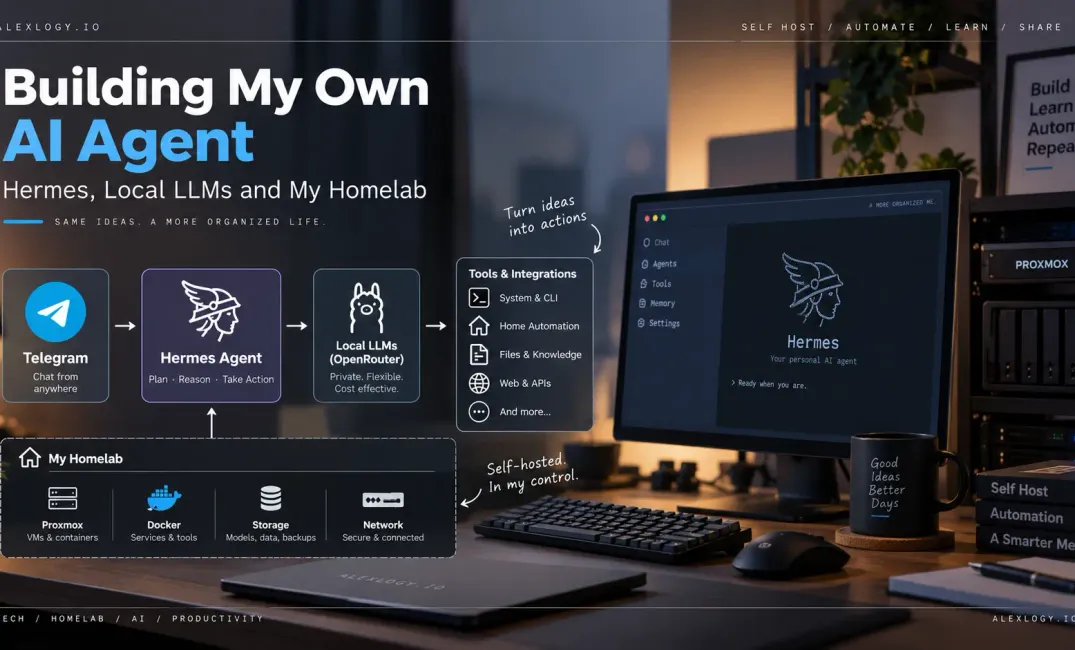
This led me down another rabbit hole in my homelab, experimenting with Hermes Agent, local LLMs, OpenRouter, Telegram and eventually an architecture where local and cloud AI models can work together.
This post documents the beginning of that journey.
What Exactly Am I Trying to Build?
Before going into Hermes, I think it is important to explain what I actually mean by an AI agent.
A traditional interaction with an LLM is relatively simple:
User → LLM → ResponseYou provide a prompt and the model generates a response.
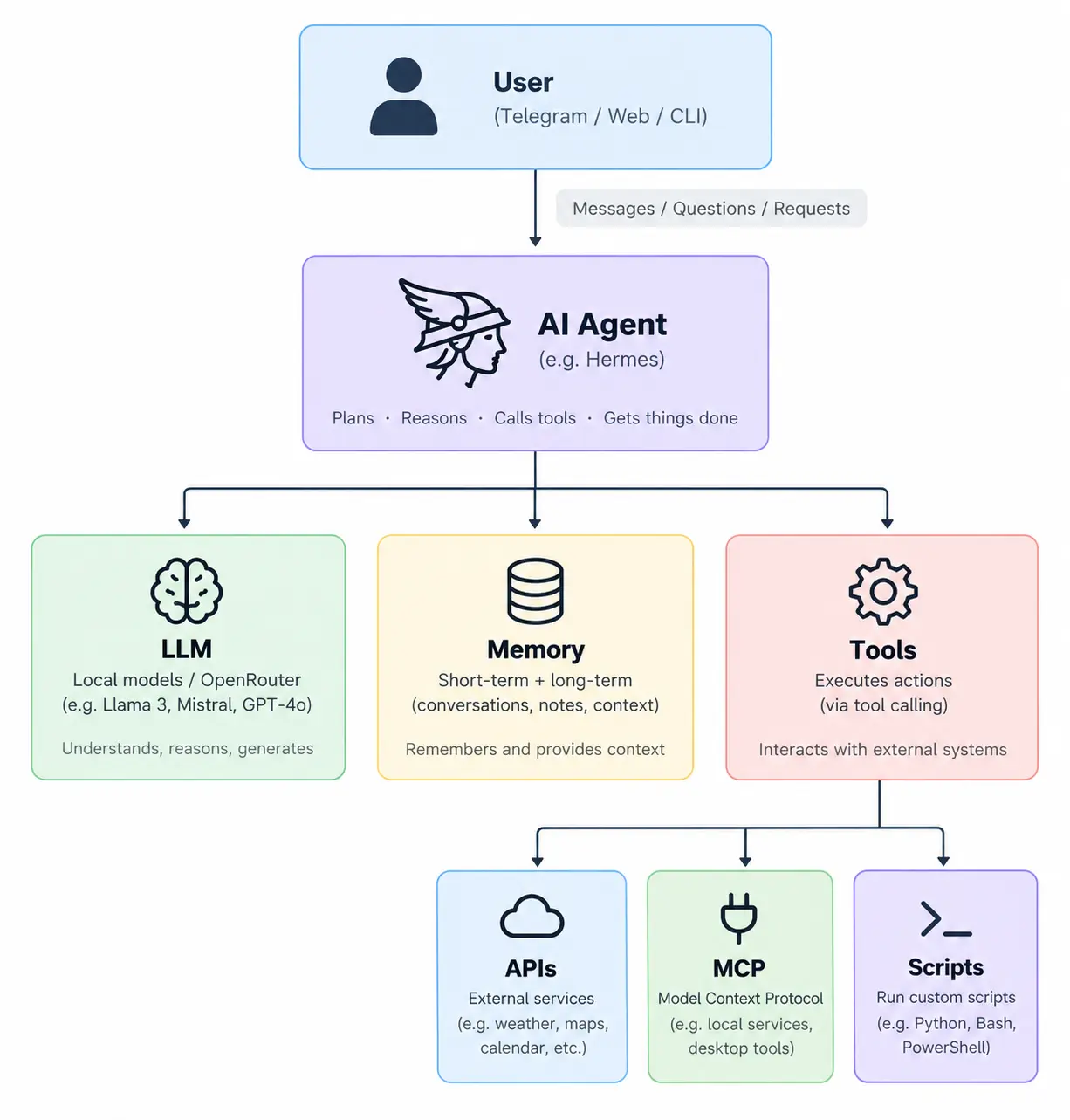
An AI agent extends this by giving the LLM access to additional capabilities.
For me, this is where AI starts becoming much more interesting.
The LLM provides the intelligence and reasoning capability, while the agent provides the ability to actually interact with systems.
This is very similar to how I think about infrastructure automation. Terraform by itself is useful because it can provision infrastructure. Ansible is useful because it can configure systems. CI/CD pipelines are useful because they orchestrate multiple actions together.
An AI agent potentially adds a reasoning layer on top of these tools. Instead of explicitly defining every workflow, I can tell the agent what I want to achieve and allow it to determine which tools should be used.
That was the idea I wanted to explore.
Why Build My Own AI Agent?
There are already plenty of AI assistants available today, so naturally the question is:
Why bother hosting one myself?
For me, there are several reasons.
Learning
The biggest reason is simply learning.
Throughout my career, I have always preferred learning technologies by actually building something.
That’s also one of the main reasons I maintain a homelab.
Running Kubernetes yourself teaches you things that managed Kubernetes abstracts away. Running your own SIEM forces you to understand log ingestion and detection. Running your own container infrastructure forces you to understand networking, storage and lifecycle management.
I see AI infrastructure in exactly the same way.
Using an LLM is one thing.
Building around one forces me to understand:
- Local inference
- GPU and VRAM requirements
- Quantization
- Context windows
- Tool calling
- Agent architecture
- Memory
- Model routing
- APIs and MCP
- Security boundaries
As AI becomes increasingly integrated into enterprise technology, I think understanding the infrastructure underneath it will become just as important as knowing how to prompt it.
Privacy
Not every task needs to be sent to an external AI provider.
If a request can be handled by a model running locally in my homelab, there are cases where I would prefer the information to remain within my environment.
That doesn’t mean I intend to run everything locally.
Which leads to an important distinction:
My objective isn’t Local AI instead of Cloud AI.
It’s:
Local AI + Cloud AI.
Use the right model for the right task.
Cost
Cost is another consideration.
A normal chatbot might make one LLM request when I ask it a question.
An agent can make multiple calls while reasoning through a task, executing tools and processing their results.
Using an expensive frontier model for every step doesn’t make much sense to me if a smaller local model can handle some of those tasks perfectly well.
This is essentially workload placement.
And coming from cloud infrastructure, that is a problem I’m very familiar with.
Why I Chose Hermes Agent
While researching AI agents, I looked at several approaches before deciding to start experimenting with Hermes Agent.
What interested me about Hermes was the architecture.
Rather than treating the LLM as the entire application, Hermes acts as the orchestration layer between the user, models, memory and tools.
Conceptually:
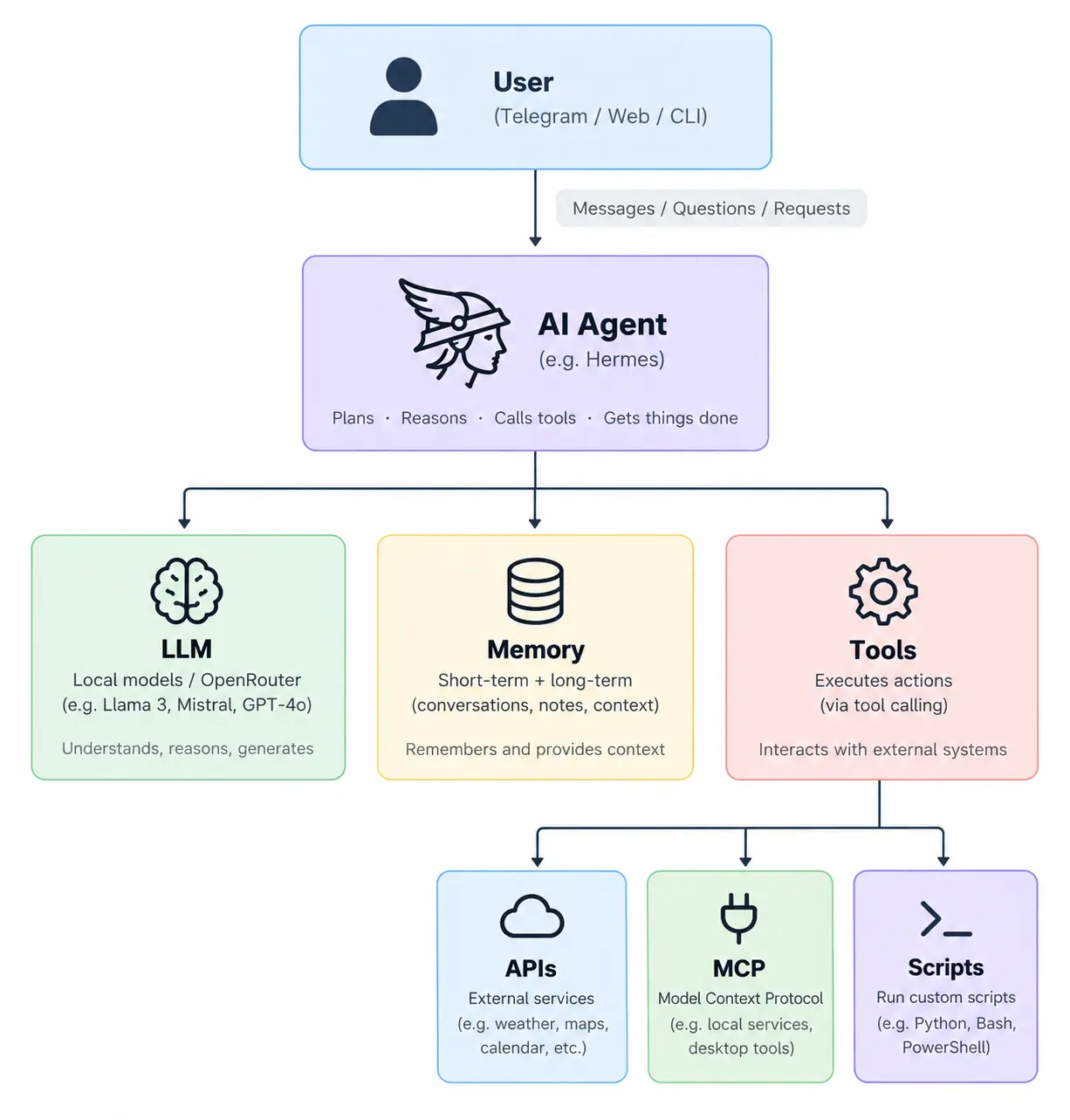
The part I particularly like is that Hermes doesn’t have to be permanently tied to one model.
The agent becomes the orchestration layer.
The underlying model becomes interchangeable.
That opens up some interesting possibilities.
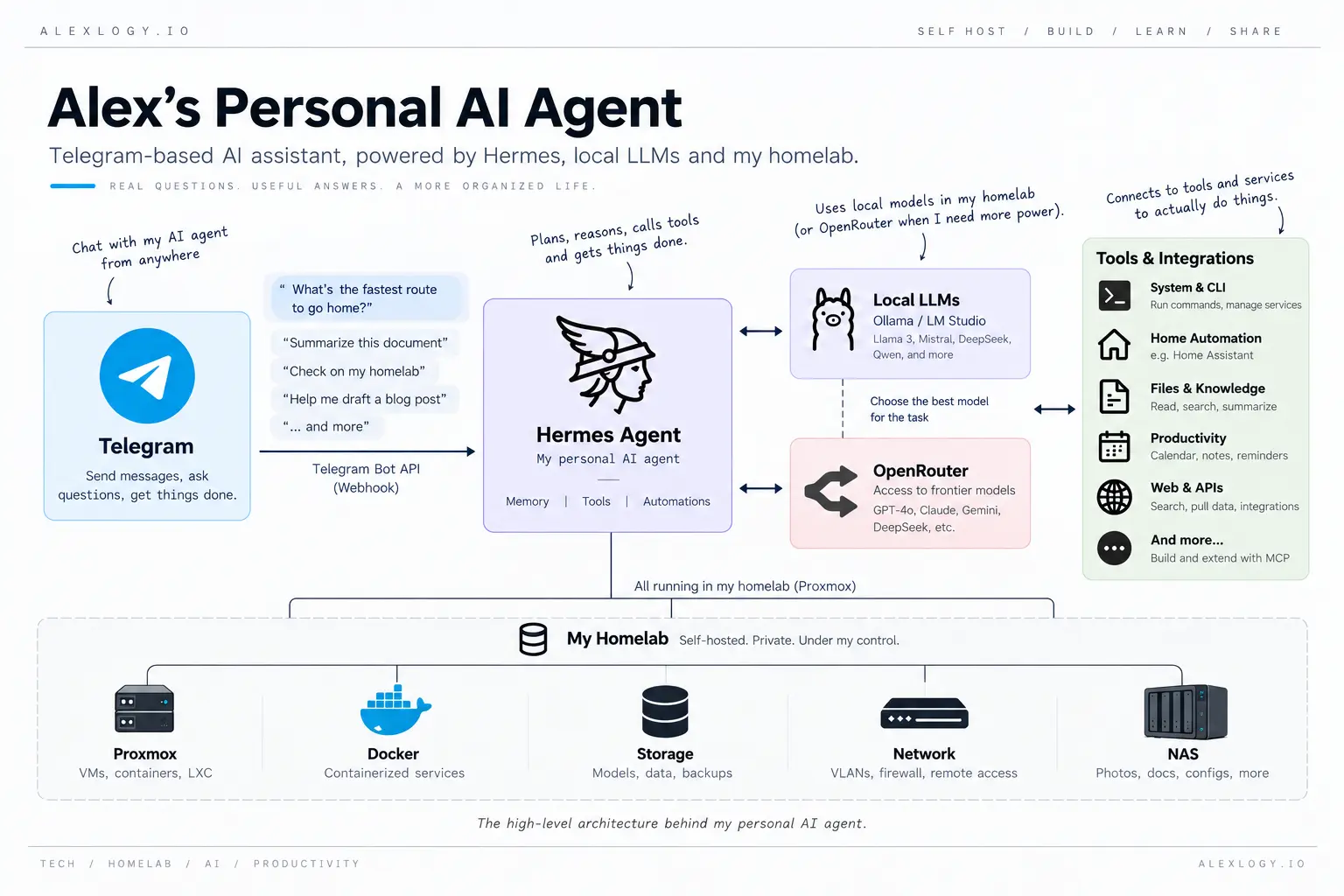
My Current Architecture
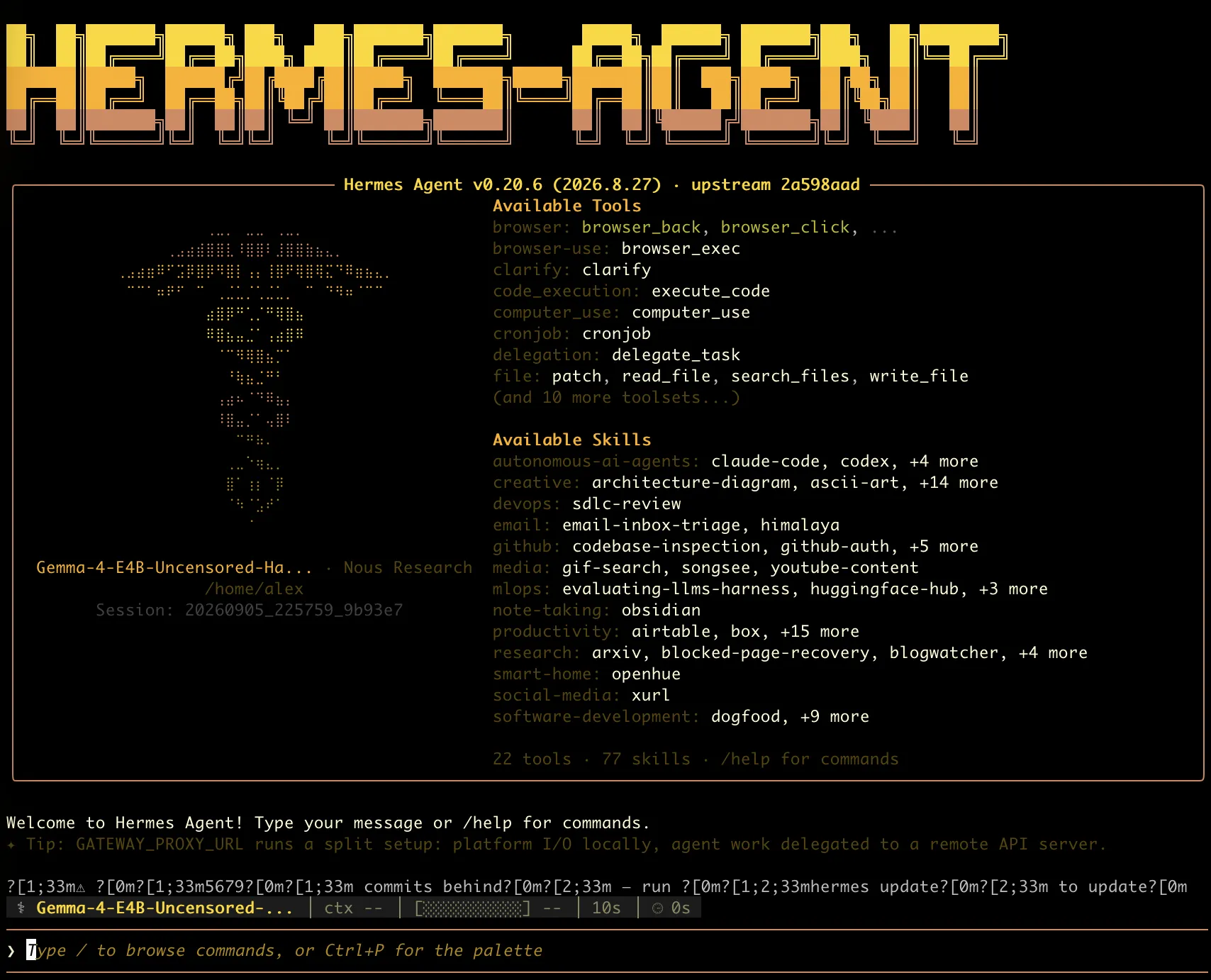
I am running Hermes inside a dedicated virtual machine in my homelab.
Rather than installing Hermes directly onto one of my existing servers, I run it as a dedicated VM inside a separate DMZ network with no default access to my trusted internal networks.
My local AI machine which is running on my personal desktop (aka gaming PC 😄) has an NVIDIA RTX 4090 with 24GB of VRAM. The 4090 while a very capable GPU for local inference, it's 24GB of VRAM creates an interesting constraint, which I will talk about later.
Network Isolation
One of the decisions I made early on was to treat the Hermes Agent VM as an untrusted workload.
Hermes runs as a dedicated virtual machine inside my DMZ network, which is isolated from my internal networks, devices and servers.
By default, the agent has no direct network access to my trusted homelab environment.
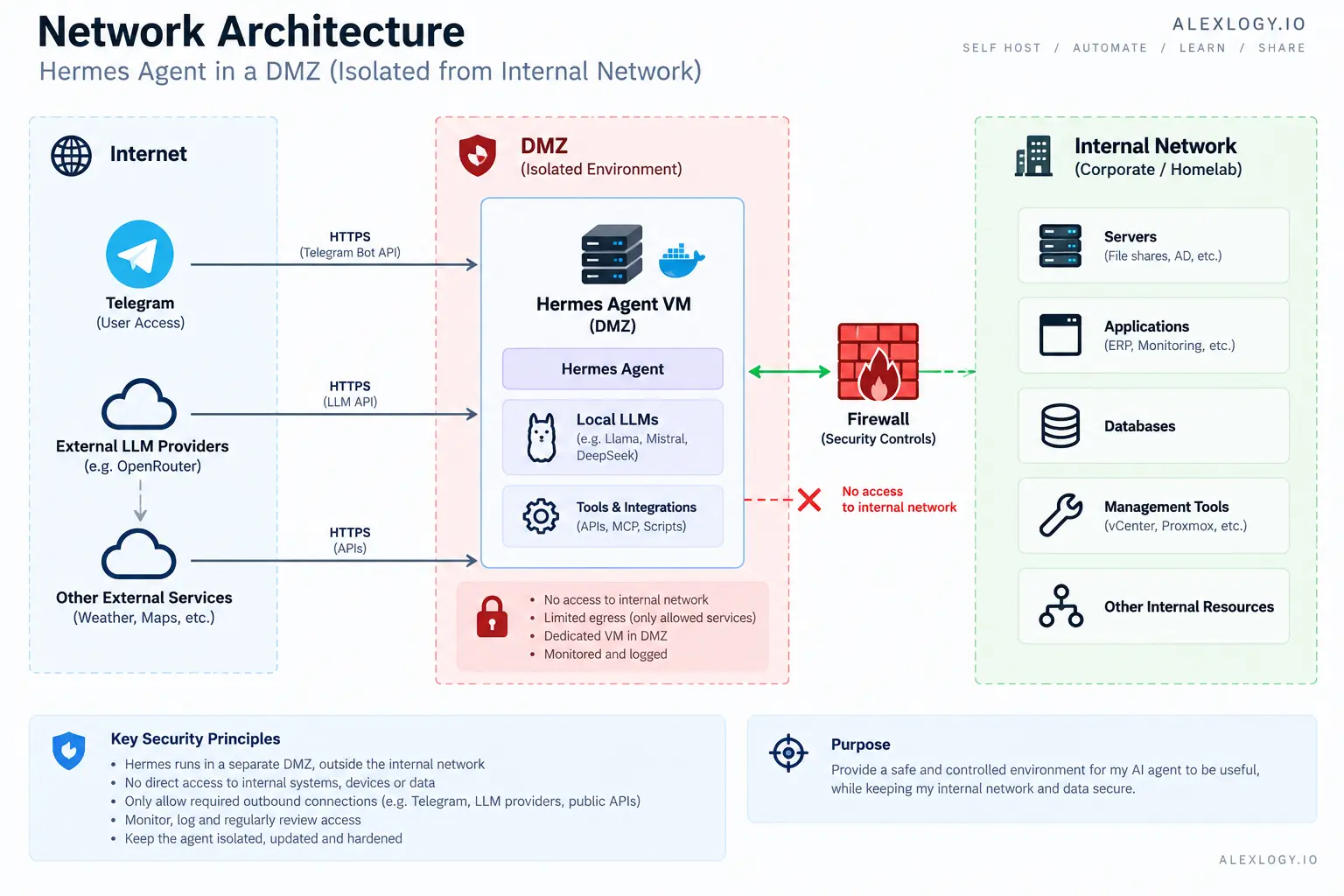
This is intentional.
An AI agent is fundamentally different from a normal application because it may eventually be able to consume untrusted content, reason about actions and invoke external tools.
I therefore don’t want the agent itself to become a trusted endpoint simply because it is running inside my homelab.
Any future access from Hermes to internal services will need to be explicitly designed and permitted through the firewall on a service-by-service and port-by-port basis.
For example, if I eventually want the agent to retrieve monitoring information, I would rather expose a narrowly scoped API or read-only service to the DMZ than give Hermes unrestricted access to the monitoring server or the internal network.
The security model I am aiming for is therefore:
Default deny → explicitly allow only what the agent needs.
From a network security perspective, this also limits the blast radius if the agent, one of its tools, or a dependency is ever compromised.
The fact that Hermes can communicate with an external service such as Telegram or an LLM API should not automatically create a path back into the rest of my homelab.
Running LLMs Locally
When I first started looking at local models, I kept encountering terms such as:
FP16, BF16, FP8, INT8, INT4, AWQ, GPTQ and GGUF.
These formats matter because model size has a direct impact on how much memory is required.
As a simplified example, a 30-billion-parameter model using 16-bit weights would require approximately:
30 billion parameters × 2 bytes ≈ 60GBAnd that’s before accounting for KV cache and other runtime memory requirements.
Clearly, that isn’t going to fit into 24GB of VRAM.
Quantization reduces the precision of the model weights, significantly reducing memory requirements.
Very simplistically:
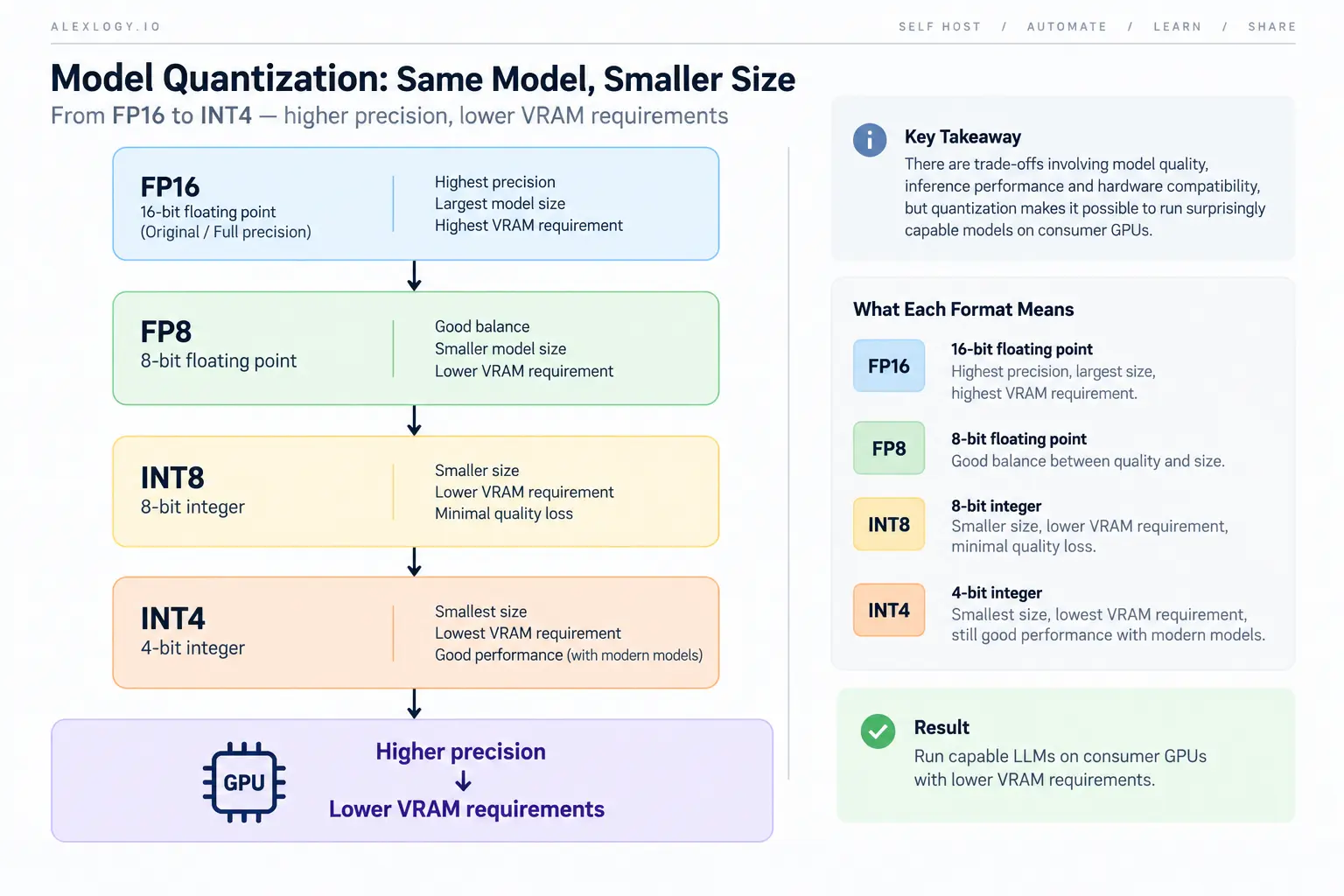
There are trade-offs involving model quality, inference performance and hardware compatibility, but quantization makes it possible to run surprisingly capable models on consumer GPUs.
I quickly realised that local AI is another form of capacity planning.
You are constantly balancing:
Model Capability ↔ VRAM ↔ Performance ↔ Quantization ↔ Context Length
I have used this tool called llmfit which is excellent in showing models that fit my current setup and shows the estimated token/s speed. I would recommend anyone who use to run local llm to use this tool for sizing.
Local Models vs Cloud Models
After experimenting with local models, one conclusion became clear.
I don’t think the answer is choosing between local or cloud AI.
Both have advantages.
Local models give me:
- Better control over my data
- No per-token API charges
- Control over the inference environment
- The ability to experiment freely
- Very low latency with appropriately sized models
Cloud models give me access to significantly larger and more capable models without having to purchase enterprise GPU infrastructure.
The principle is straightforward:
- Use local models whenever they’re good enough.
- Use cloud models when additional capability is required.
This is very similar to designing infrastructure.
You don’t deploy every workload onto the biggest and most expensive compute instance available.
You select resources based on the workload.
I think AI models should eventually be treated in much the same way.
Why I’m Using OpenRouter
For cloud inference, I decided to use OpenRouter rather than integrating multiple AI providers individually.
Without an abstraction layer, I could eventually end up maintaining several integrations:
Hermes
 ├── Provider A
 ├── Provider B
 ├── Provider C
 └── Provider D
Instead, OpenRouter gives me a common interface to multiple models:
                    Hermes
                       │
                       ▼
                  OpenRouter
                       │
          ┌────────────┼────────────┐
          │            │            │
       Model A      Model B      Model C
For experimentation, this makes things considerably easier.
I can change models without redesigning the integration every time, and it gives me a straightforward way to compare different models against the same workloads.
Longer term, I want model selection to become more dynamic rather than manually choosing one model for everything.
Telegram as the Interface
I connected Hermes to Telegram as the primary interface to the agent.
There is nothing particularly sophisticated about Telegram itself, but it changes how useful the system feels.
Instead of opening another web interface or connecting directly to my homelab, I can interact with the agent from my phone.
Me → Telegram → Hermes → Model → Tools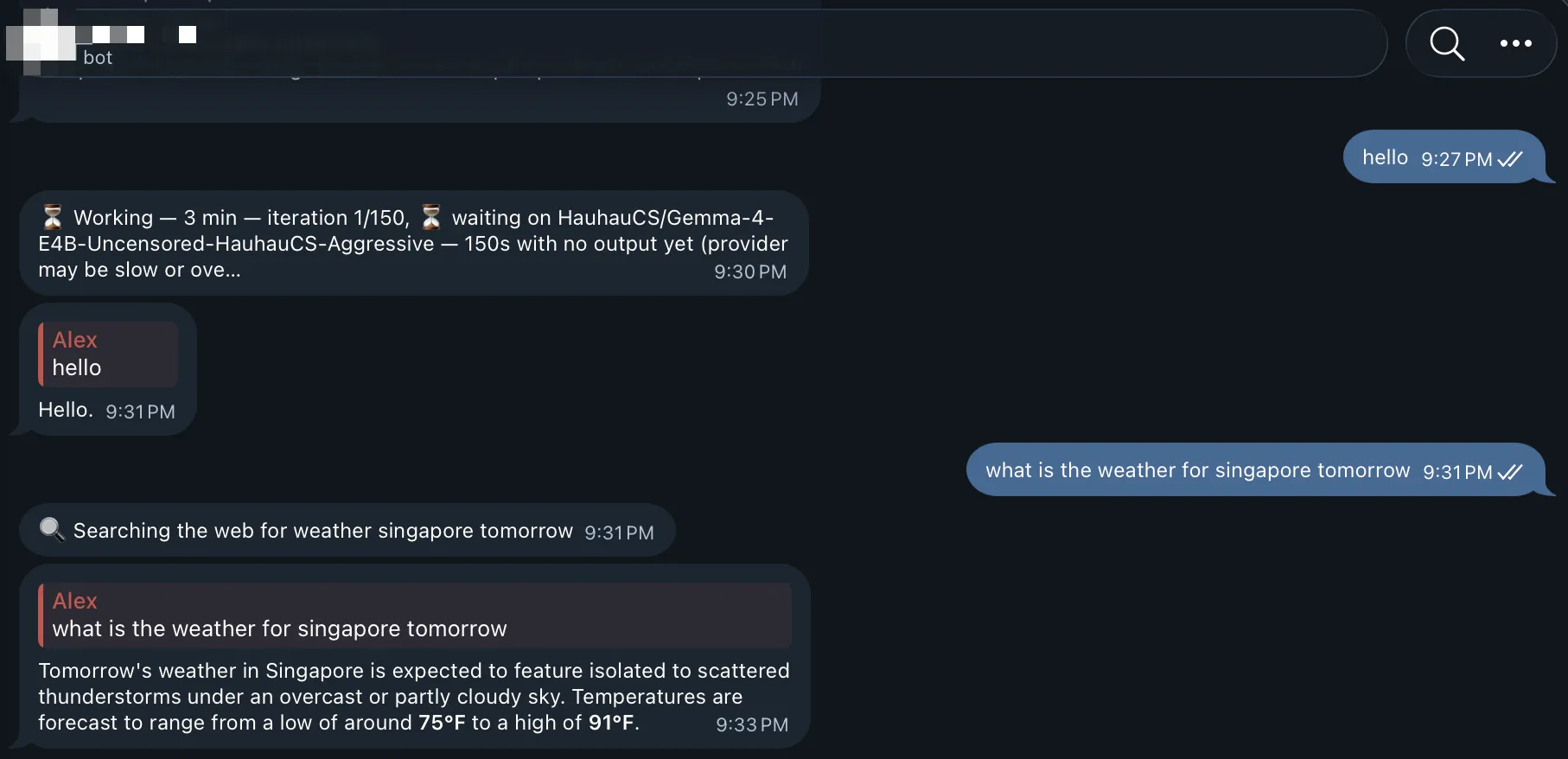
Eventually, the agent could help me with:
- Homelab monitoring
- Infrastructure status
- Research
- Summarising information
- Personal reminders
- Executing automation workflows
- Calling APIs
- Interacting with self-hosted applications
Telegram is simply the interface.
The interesting part is everything happening behind it.
Giving an AI Access to My Homelab
This is where things become significantly more powerful.
It’s also where things become significantly more dangerous.
An LLM giving me an incorrect answer is annoying.
An LLM executing an incorrect command against my infrastructure is a completely different problem.
I don’t think an AI agent should automatically receive unrestricted access simply because it runs inside my environment.
The security model therefore matters.
Least Privilege
The agent should only receive the permissions required for the task.
If it only needs to retrieve the status of a service, there is no reason to give it administrative privileges to modify that service.
Isolation
Hermes runs inside its own VM.
I definitely don’t want an experimental AI agent running directly on my hypervisor or other critical infrastructure.
Secrets
API keys, SSH keys and authentication tokens should not be embedded into prompts or exposed unnecessarily.
The same secrets-management practices we apply to applications should apply to agents.
Human-in-the-Loop
For potentially destructive actions, I want human approval.
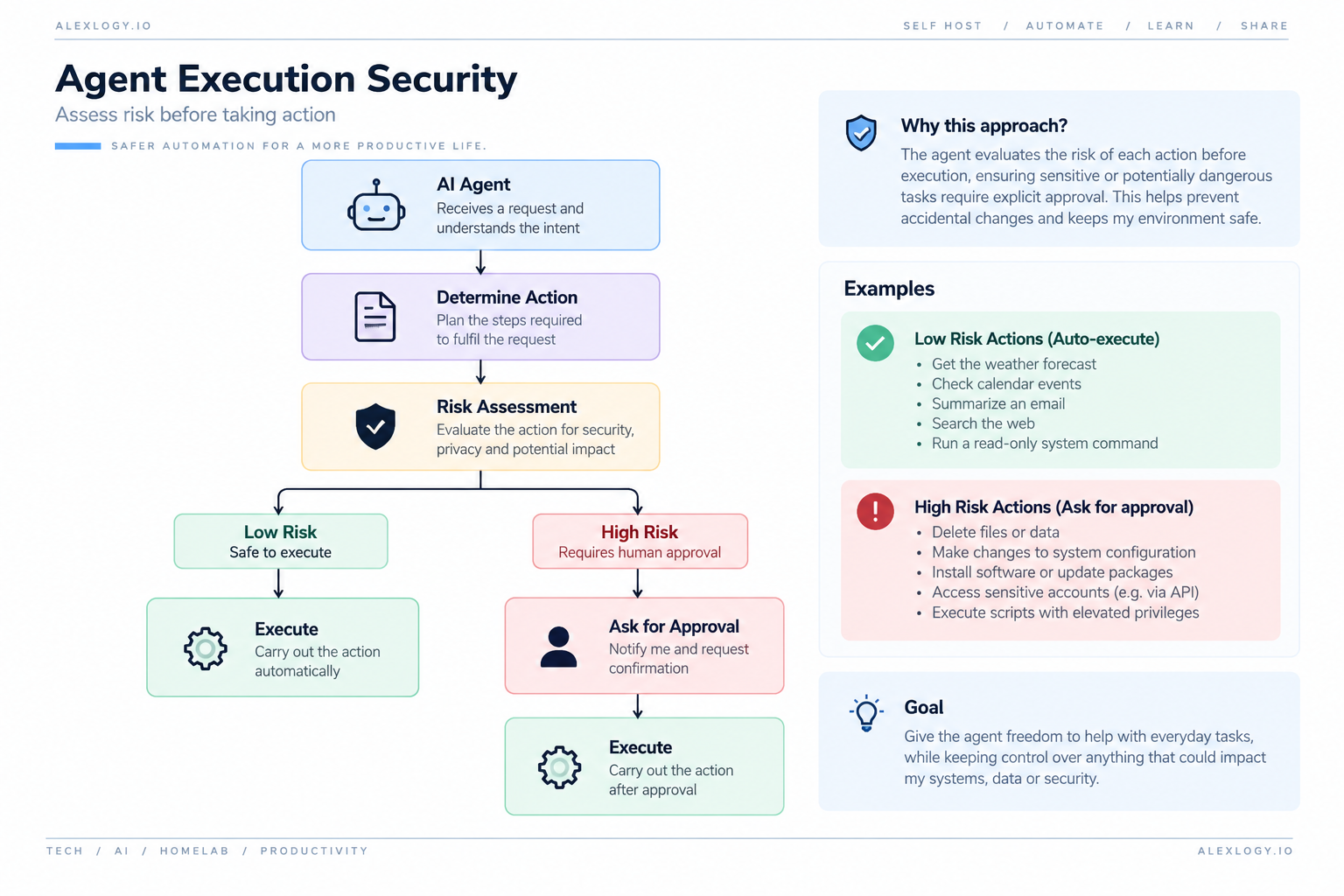
For me, this is one of the most important aspects of building an agent.
The objective is not to give AI unlimited control.
It’s to give AI controlled access to capabilities.
Prompt Injection Changes the Security Model
There is another security problem that becomes important once an agent can access external information: prompt injection.
If the agent can browse websites, read emails or process documents, then that external content becomes input to the model.
A malicious document could potentially contain instructions intended to manipulate the agent.
This creates an interesting security problem.
Traditional infrastructure security asks:
What is this application allowed to access?
Agent security also needs to ask:
What information is the agent allowed to trust, and what actions can that information cause it to perform?
That becomes especially important once agents have access to tools capable of modifying real systems.
I’m still experimenting with this area, and I expect the security architecture around my agent to evolve considerably.
Where MCP Fits In
Another technology I am exploring is the Model Context Protocol (MCP).
The idea behind MCP is to provide a standardized way for AI applications to interact with tools and data sources.
Without a common interface, every integration potentially becomes custom:
Agent
 ├── GitHub Integration
 ├── Database Integration
 ├── Monitoring Integration
 └── Custom APIs
A standardized protocol potentially changes this into:
                         Agent
                           │
                           ▼
                          MCP
                           │
              ┌────────────┼────────────┐
              │            │            │
           GitHub       Database    Monitoring
Coming from an infrastructure background, this concept makes a lot of sense to me.
Standard interfaces are usually what allow ecosystems to scale.
I haven’t gone far enough with MCP yet to write about it properly, but it is definitely something I intend to explore as part of this project.
Making the Agent Actually Useful
One thing I don’t want is for this to become another homelab POC that I build, play with for a week and then forget about.
The agent needs to solve actual problems.
One use case I want to implement is surprisingly mundane.
Every evening when I leave the office to pick up my daughter, I have several possible driving routes.
Depending on traffic conditions, the fastest route can change significantly.
Instead of manually checking the routes every day, I eventually want the workflow to look like this:
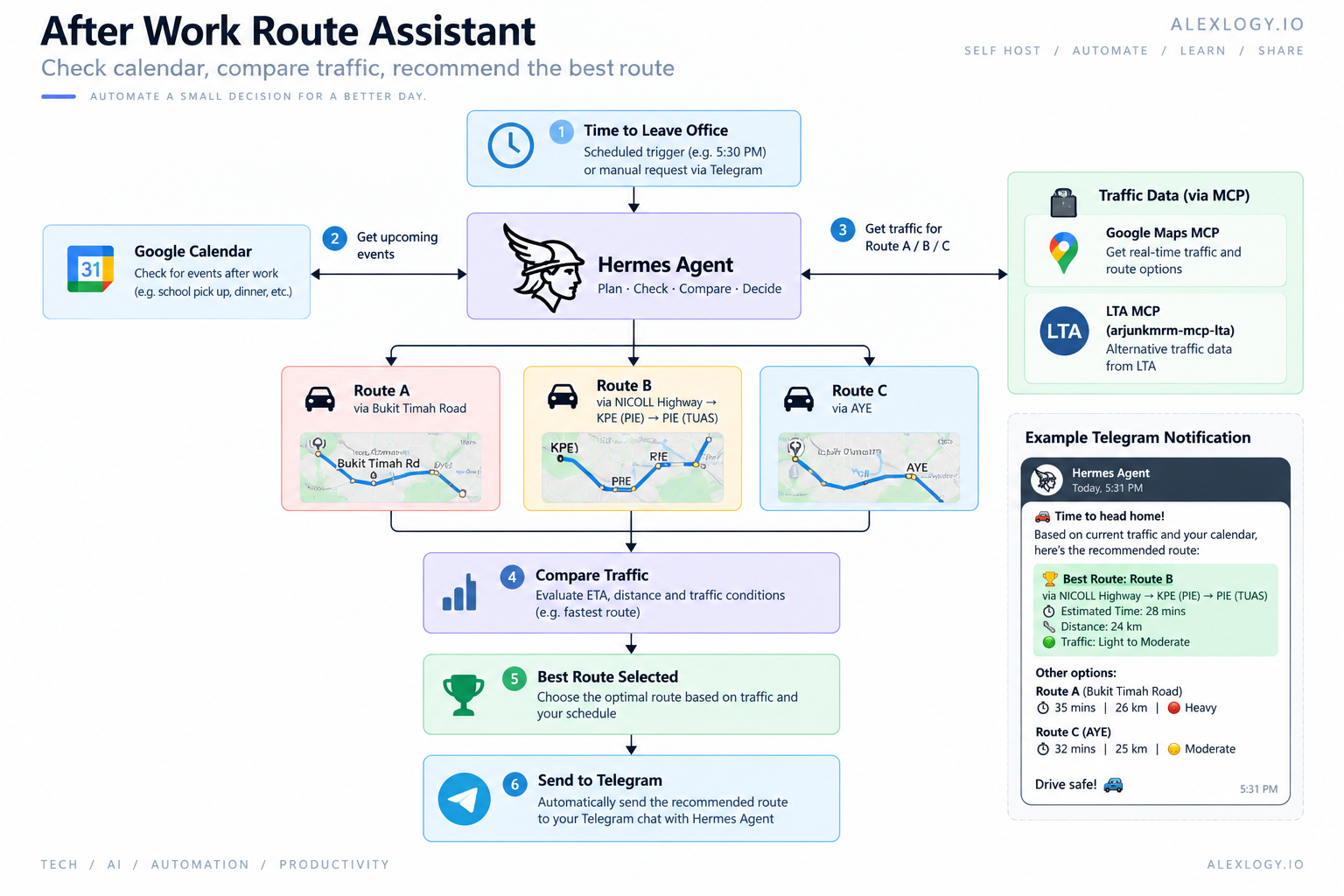
This isn’t an incredibly complicated AI use case. But that’s exactly the point.
For me, the value of a personal AI agent isn’t necessarily having it perform incredibly complicated tasks.
It’s removing small repetitive decisions from my day.
And once the underlying architecture works, many different workflows can use the same platform.
Where I Want to Take This
My current Hermes environment is still very much a work in progress.
Longer term, I’m working towards something closer to a personal AI operations layer.
What I’ve Learned So Far
One thing this project has already changed is the way I think about AI.
Previously, I spent a lot of time thinking about the models themselves.
Which model is better?
Which one has the largest context window?
Which one performs best on benchmarks?
After experimenting with agents, I think the model is only one component.
A useful AI system is really a combination of:
                         AI System
                             │
              ┌──────────────┼──────────────┐
              │              │              │
            Model          Context         Tools
              │              │              │
          Reasoning        Memory         Actions
A slightly weaker model with the right context and access to useful tools can potentially be far more useful than a stronger model that knows nothing about my environment.
This is where AI agents become particularly interesting to me.
The future may not simply be one gigantic model doing everything.
It could be a combination of models, tools and data sources coordinated by an agent.
What’s Next?
There is still a lot I want to experiment with.
My immediate list includes:
- Testing more local models
- Comparing Qwen, DeepSeek and other models
- Understanding AWQ, GPTQ, GGUF and FP8 properly
- Improving local inference performance
- Building a local/cloud model routing strategy
- Adding useful tools
- Experimenting with MCP
- Improving memory
- Strengthening security boundaries
- Building useful personal automations
I also want to benchmark how much of my normal AI workload can realistically be handled locally by the RTX 4090.
Rather than comparing models purely through standard benchmarks, I’m more interested in workloads I actually use:
Infrastructure troubleshooting. Coding. Log analysis. Technical research. Tool calling. General reasoning.
That will probably be the next part of this series.
Final Thoughts
Building my own AI agent has turned into another one of those homelab projects where I started with a relatively simple objective and ended up discovering an entire ecosystem behind it.
I originally just wanted an AI assistant I could access through Telegram.
That quickly turned into learning about agent frameworks, local inference, quantization, model routing, tool calling, MCP and AI security.
And I’m still only at the beginning.
My goal isn’t to replace ChatGPT or build my own version of a commercial AI platform.
The goal is to understand how these systems work and gradually build an AI assistant tailored to my own environment.
Just like my homelab gives me somewhere to experiment with Kubernetes, cybersecurity and infrastructure, it is now becoming somewhere for me to experiment with AI infrastructure as well.
The architecture will definitely change as I continue experimenting.
But that’s part of the fun of running a homelab.
You build something.
You break it.
You understand why it broke.
Then you build it better.