

What is SAML Authentication
SAML stands for Security Assertion Markup Language. It's an open standard based on Extensible Markup Language (XML) used to exchange authentication and authorization data between two parties:
- Identity Provider (IdP): Performs authentication and pass the user's identity and authorization to the Service Provider (SP). Common IdPs include Okta, Keycloak, Microsoft Entra ID, etc.
- Service Provider (SP): It's the application the user wants to access. SP will trust and receive the data from the IdP and grants the user access.
For enterprise environment, the identity of users are normally stored in a centralized directory such as Microsoft Active Directory (AD). Traditionally, enterprise apps are deployed to run within the corporate network and are designed to obtain user information through the AD via Lightweight Directory Access Protocol (LDAP). However, with the modernisation of the web, many enterprise applications are moving to cloud-based environments which moved it beyond the boundaries of the corporate network and domain. As such, federated authentication is the secure solution to replace exposing protocols such as LDAP over the internet.
Key Components in a SAML Authentication Flow
Before we go into the SAML authentication flow, it's important to understand the key components first.
- Identity Provider (IdP)
The Identity Provider is the system that authenticates the user. Examples of IdP are:
- Okta
- Microsoft Entra ID
- Keycloak
- Auth0
- AWS Cognito
The Indentity Provider verifies the user identity, apply policies such as Multi-Factor Authentication (MFA), and issues the SAML assertion.
- Service Provider (SP)
The Service Provider is the application in which the user is trying to access. Examples of applications are:
- Internal web application
- SaaS platform
- Admin portal
- Enterprise application
The Service Provider trusts the Identity Provider and accepts the SAML assertion as Proof of Identity.
- SAML Assertion
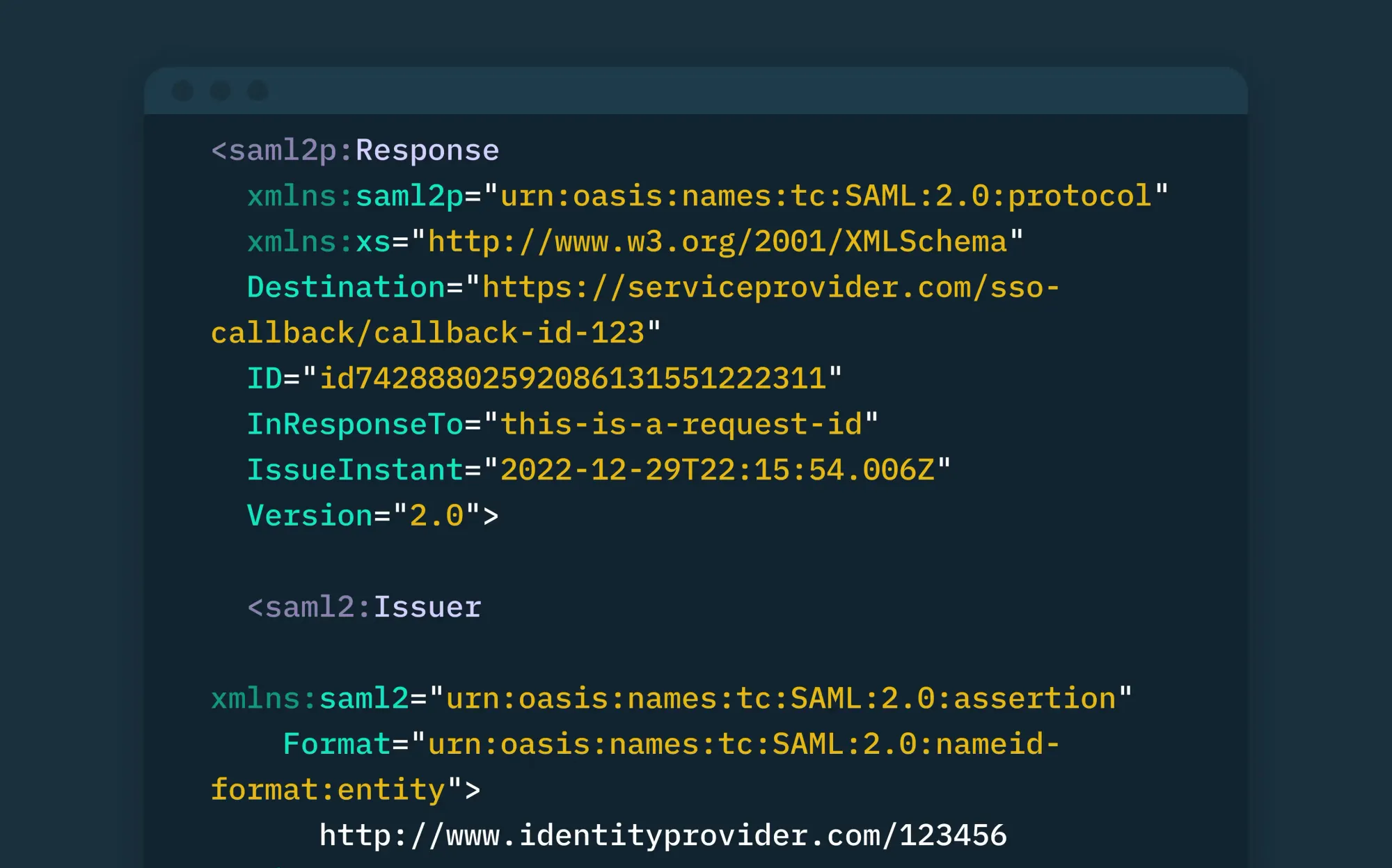
The SAML assertion is the core payload sent by the Identity Provider to the Service Provider. It includes the following data:
- Subject
- Authenticated User Identity
- NameID
- Authenticated User Identity
- Issuer
- Identity Provider
- Conditions
- Validity Period:
- NotBefore
- NotOnOrAfter
- Audience Restriction
- Validity Period:
- Attribute Statement
- User Details such as:
- first name
- last name
- department
- role
- groups
- User Details such as:
- Signature
- Certificate
The assertion is signed so the Service Provider can verify the authenticity from a trusted Identity Provider.
- Assertion Consumer Service (ACS) URL
The Assertion Consumer Service (ACS) endpoint is where the Service Provider receives the SAML response from the Identity Provider.
- Metadata
The Identity Provider and Service Provider often exchange metadata which include information such as:
- Entity ID
- X509 Certificates
- Single Sign-On (SSO) URL
- Single Logout (SLO) URL
- Supported Bindings
Metadata helps both sides to establish trust and know where to send requests.
How SAML Authentication Works
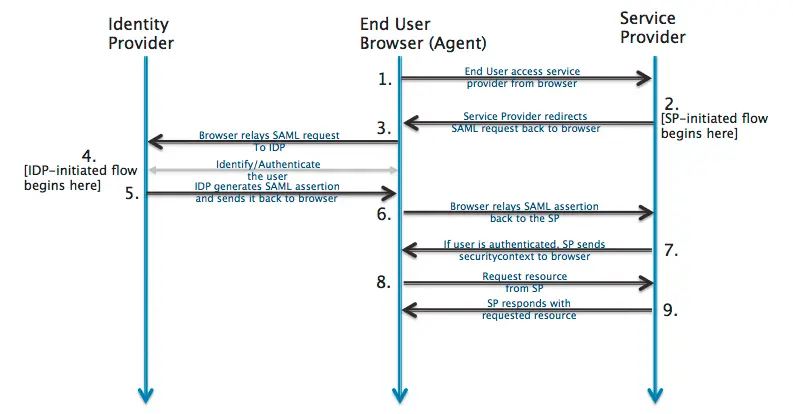
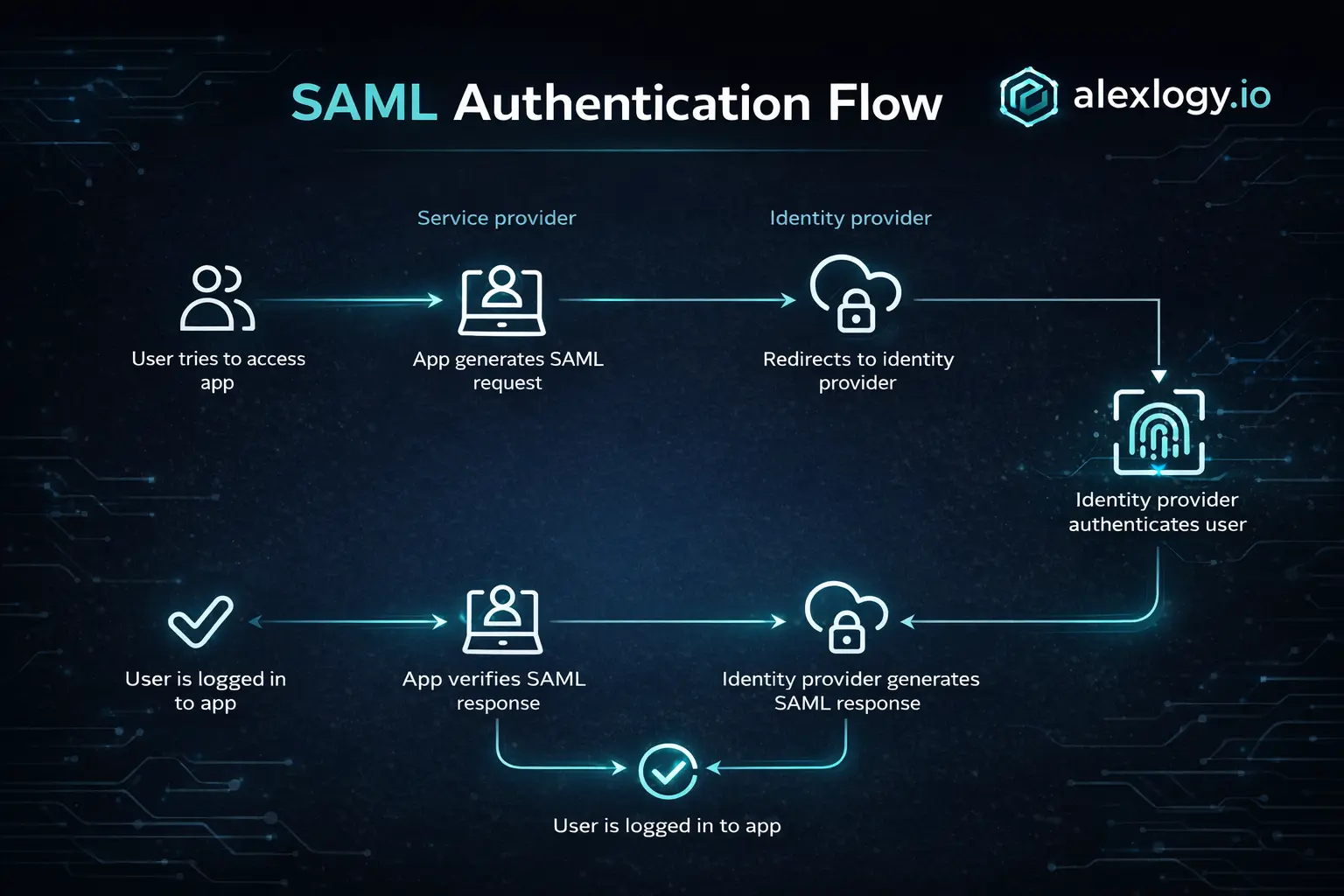
- User request a protected resource
The user tries to access a protected page in the Service Provider application. The Service Provider checks whether the user already have a valid authenticated session.
- Service Provider initiates the SAML authentication flow
Service Provider will initiate the SAML authentication flow if no valid authenticated session found.
- Service Provider redirects user to Identity Provider
The Service Provider will create a SAML authentication request and redirects the browser to the Identity Provider.
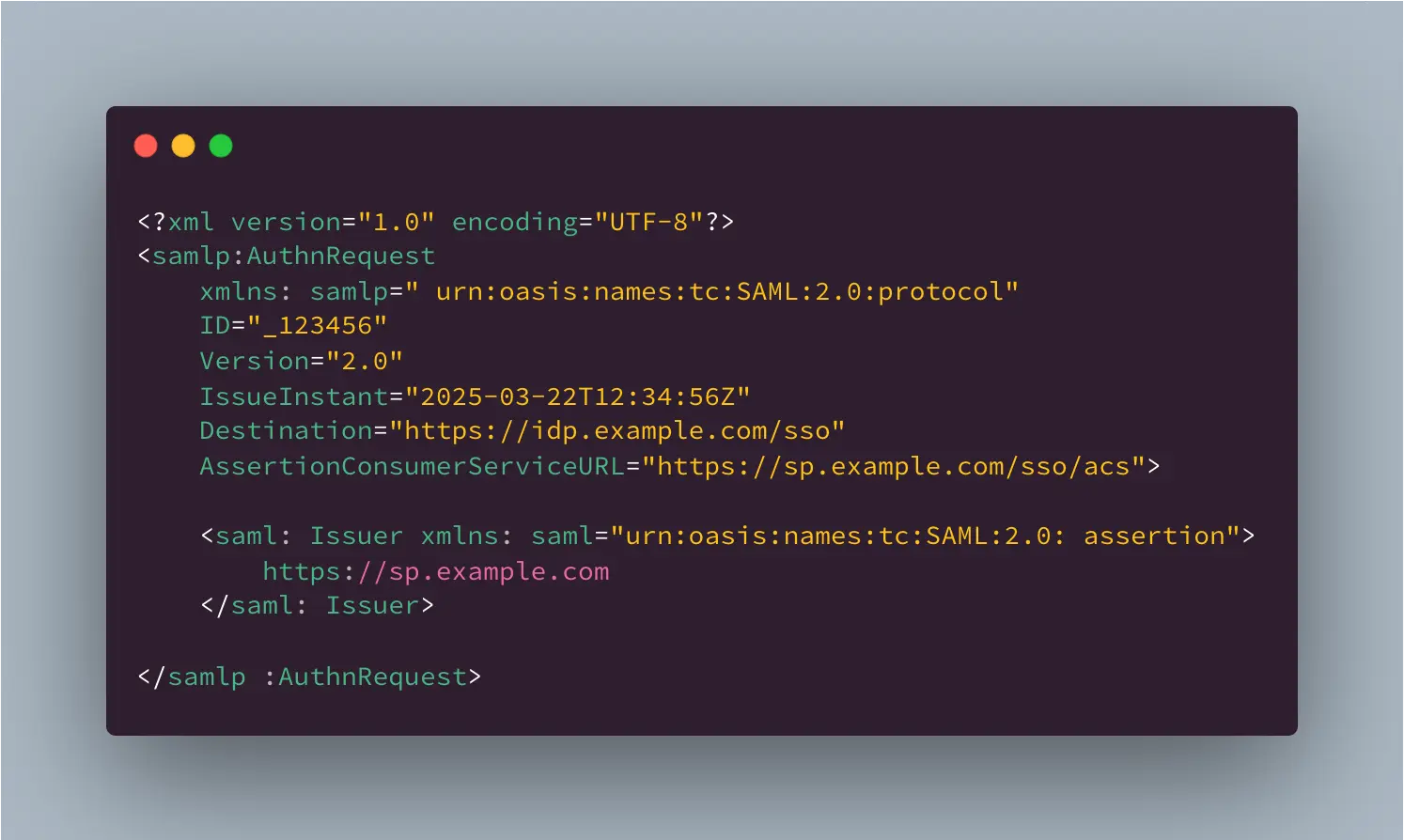
The request usually include information such as:
- SP Entity ID
- Requested Destination
- Unique Request ID
At this stage, the browser should be redirected to the Identity Provider login page.
- Identity Provider sends SAML Assertion to the ACS URL
The Identity Provider send the SAML Assertion via SAML Response to the Service Provider's ACS endpoint. This assertion payload is typically sent as a HTTP POST request from the browser to the Service Provider.
The assertion may be signed, encrypted or both. It depends on the configuration in your Identity Provider and Service Provider setup.
- Service Provider Validates the SAML Response
Once the Service Provider receive the SAML Response, it will verify the following:
- Is the assertion signature valid?
- Was it issued by the expected Identity Provider?
- Has it expired? Check the validity
- Does the Audience match the Service Provider?
- Does the SAML Response correspond to the original SAML Authentication Request?
- Is the destination URL correct?
If any of the above items fail, the authentication attempt is rejected.
- Service Provider creates a local authentication session
If the assertion is valid, the Service Provider extracts the user identity and attributes before creating a local authentication session. The Service Provider can then rely on it's own session cookie for authentication validation until the session expires.
- User access Protected Resource in Service Provider's Application
The user is finally redirected back to the protected resource and can use the application as an authenticated user.
To summarise, the following diagram shows the flow from start to end.
Common SAML Authentication Errors
Here are some of the command issues you might face when you're implementing SAML for the first time.
- ACS URL Mismatch
If the ACS URL configured in the Identity Provider does not match the Service Provider endpoint, the IdP will send the SAML assertion to the wrong place, resulting in HTTP 404 errors or failed login callbacks.
- Audience Restriction Mismatch
If the audience in the assertion does not match the Service Provider entity ID expected by the Service Provider, the Service Provider will reject the SAML Assertion Response, resulting in scenario where login suceeds at the Identity Provider but fails at the Service Provider.
- Missing Attributes
If the attribute statements at the Identity Provider are not configured correctly, the Service Provider might not receive the appropriate attributes after authentication resulting in missing user identity information.
Bonus: Full Working Example (Go + Okta)
Understanding SAML conceptually is easy, but implementing it in code is where most engineers normally struggle.
To illustrate how to implement this in a application, I have built a working example in Go that demonstrates:
- SAML Authentication with Okta
- Attributes Extraction from Okta
- Protected Routes
- Logout handling (Okta Session & Local Session)
You can view the code in my Github repository below:
 alexlogy
You can refer to my other post on "How to Implement SAML Authentication in Go with Okta" for the implementation breakdown.
Final Thoughts
SAML Authentication can feel complicated at first because of the number of components involved in the authentication flow. Once you understand the authentication flow of SAML authentication, it's actually very simple as it summarise into the following three steps:
- The user authenticates with the Identity Provider
- The Identity Provider sends a trusted assertion to the Service Provider to validate the user's identity
- The Service Provider validates the assertion and create a local authenticated session for the user
If you work in enterprise environment, understanding how SAML works is a valuable skill as it remains deeply integrated in the enterprise world.