

I have been dabbling with Kubernetes since 2019 when it was still v1.14. What started as a POC to replace our AWS Elastic Beanstalk and AWS Elastic Container Service became full-fledged AWS EKS clusters. Over the years, my team was managing many kubernetes clusters with all the workloads spread across multi-cloud platforms such as AWS, GCP, Alibaba Cloud.
The real-life experiences gained from designing and managing these kubernetes clusters have led me to think about getting certified, not as a validation but as a personal achivement. Don't get me wrong, being certified is also validating your knowledge and fundamentals on the topic, but real-life experiences will greatly outweigh what you will learn from memorizing the concepts and exam structure. That being said, the performance-based exams by Linux Foundation is really challenging and you might not pass if your fundamentals are weak.
What is Kubestronaut?
A Kubestronaut is an individual who showed exemplary Kubernetes knowledge and skills by successfully passing every CNCF Kubernetes certifications:
- Certified Kubernetes Administrator (CKA)
- Certified Kubernetes Application Developer (CKAD)
- Certified Kubernetes Security Specialist (CKS)
- Kubernetes and Cloud Native Associate (KCNA)
- Kubernetes and Cloud Native Security Associate (KCSA)
These certifications cover the full lifecycle of cloud-native platforms from the fundamentals, cluster operations, application development and security.
Environment Preparation
The exams are proctored online by PSI, the official proctoring parner for The Linux Foundation and the Cloud Native Computing Foundation (CNCF).
Requirements
- Reliable Internet Access: Best to be on a wired connection to make sure you have a stable internet connection during the exam
- Clean workdesk and environment: The proctors are very strict and will check your entire room from ceiling to floor, make sure your desks are cleared of all items to prevent any delays to the check-in process.
- Single Monitor: I have a dual monitor setup at home and I have to disconnect 1 of the monitor
Side Note: I have AdGuard DNS and NextDNS running in my home network and that interfered with the exam environment and I got disconnected midway through the exam. Make sure you point your DNS to public resolvers like Cloudflare (1.1.1.1, 1.0.0.1) or Google (8.8.8.8, 8.8.4.4) before the start of your exam to ensure minimal disruption to your exam.
ExamUI
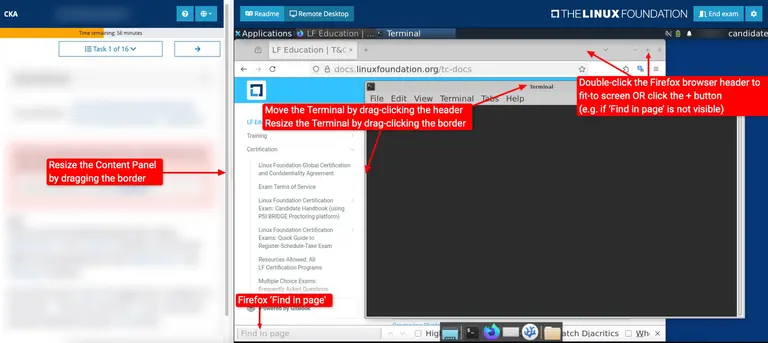
Based on Linux Foundation website, for performance-based exams, the exam will be conducted in a remote desktop environment similar to this:
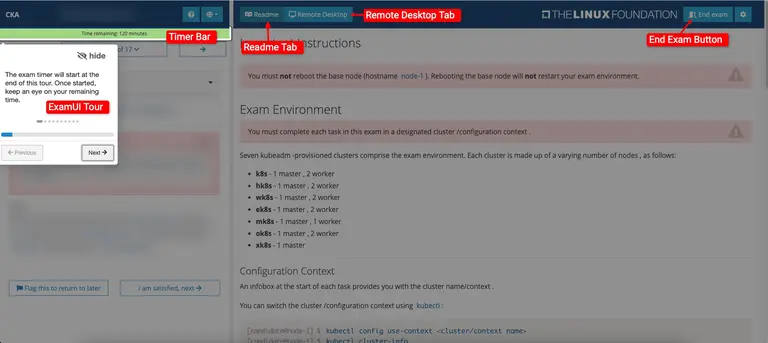
You have to get used to the environment as it might be laggy for you. Make sure you have a large monitor for the exam to make it easier for you to arrange your windows for your browser with documentation and your terminal for executing commands.
Exam Preparation
Here are some of the resources that I have used to prepare for the certification exams:
- Official Kubernetes Documentation: This is the most important resource you need to be familiar for the exams. It's also one of the only resources allowed which you can refer to during the exam for CKA, CKAD, CKS.
- KodeKloud Courses: The exam preparation courses by Mumshad Mannambeth are designed according to the exam syllabus in teaching you the fundamentals (if you're new to kubernetes), letting you practice with their hands-on labs, giving exam tips, having mock exams to test yourself before the actual exam.
- Hands-on Practices: It will really help if you have prior experiences in managing kubernetes and practices in your clusters.
The above resources are very important before you even attempt any exams. There are also other resources recommended by others are killercoda, killer.sh (more difficult than actual exams). However, I did not use any of those. I would recommend you to use those to further test and prepare yourself.
Exam Tips
Performance-based Exams (CKA, CKS, CKAD)
It's very important that you master the following before attempting the exams:
- Imperative Commands: It's very important to make sure you master imperative commands as it will save you tons of time during the exam. Try not to refer to the documentations too much just to copy the yaml file to create the object declaratively. You will definitely run out of time in the exams.
- Mastering VIM Commands: There are times where you have to edit a Deployment, Service, etc. During which, the default editor will be VIM. You need to at least know the basics of operating VIM such as dd to delete line, insert button to start editing, wq to write and exit, etc.
- Mastering Linux Commands: You need to know how to navigate through linux directories, creating/copying/moving files, etc. Most importantly, how to output the yaml into a file.
Example of Imperative Commands
An example on imperative commands will be:
kubectl create deployment <name of deployment> --image=<image name from dockerhub> --replicas=<number of replicas>If you need to further edit the deployment before creation to add in things like securityContext, you can output the yaml into a file before adding in what you wish:
kubectl create deployment <name of deployment> --image=<image name from dockerhub> --replicas=<number of replicas> --dry-run=client -o yaml > <name of deployment>.yamlOnce you're satisfied, you can then create the deployment with:
kubectl apply -f <name of deployment>.yamlShell Alias
Important alias to use during the performance-based exams:
alias k=kubectlKubernetes Command Shortcuts
Master the shortcuts for each Kubernetes object so that it can save you a couple of seconds each time you use the kubectl command during the exam.
| Object | Shortcut |
|---|---|
| pod | po |
| deployment | deploy |
| replicaset | rs |
| daemonset | ds |
| statefulset | sts |
| service | svc |
| ingress | ing |
| secret | sec |
| configmap | cm |
| namespace | ns |
| persistentvolume | pv |
| persistentvolumeclaim | pvc |
| customresourcedefinition | crd |
| node | no |
| job | job |
| cronjob | cj |
| role | role |
| horizontalpodautoscaler | hpa |
| rolebinding | rb |
| clusterrole | cr |
| clusterrolebinding | crb |
Kubernetes API Resources
Learn to use the kubectl api-resources command to see list of API resources available in the cluster instead of refering to the documentation.
kubectl api-resourcesKubernetes Explain
Learn to use the kubectl explain command to get the documentation of the resource and its fields. It will tell you what parameters it will take in the yaml config for this object. It will save you alot of time compared to refering to the documentation.
kubectl explainExams
I will try to recall and give my brief overview on each exam and my personal thoughts on each exam.
Certified Kubernetes Administrator (CKA)
Difficulty Level: 4/5
Exam Type: Performance-based
Exam Duration: 120 minutes
Number of Questions: ~17
Domains Tested
| Domain | Weight |
|---|---|
| Cluster Architecture, Installation & Configuration | 25% |
| Workloads & Scheduling | 15% |
| Services & Networking | 20% |
| Storage | 10% |
| Troubleshooting | 30% |
This was my first kubernetes certification exam and I was not prepared for the demanding nature of a performance-based exam. I literally could not finish the exam in time. I made the mistake of refering too much to the documentations to get the object Yaml file. Take note of my Exam Tips above.
I remembered questions that came out include:
- ETCD Backup and Restore
- Fixing broken cluster
- Creating sidecars
Certified Kubernetes Security Specialist (CKS)
Difficulty Level: 5/5
Exam Type: Performance-based
Exam Duration: 120 minutes
Number of Questions: ~19
Domains Tested
| Domain | Weight |
|---|---|
| Cluster Setup | 10% |
| Cluster Hardening | 15% |
| System Hardening | 15% |
| Minimize Microservice Vulnerabilities | 20% |
| Supply Chain Security | 20% |
| Monitoring, Logging, and Runtime Security | 20% |
This is by far the most challenging exam I have taken. You need to be very sure on topics such as Network Policies, Falco, Supply Chain (SBOM), SecComp, AppArmor, etc.
Certified Kubernetes Application Developer (CKAD)
Difficulty Level: 3/5
Exam Type: Performance-based
Exam Duration: 120 minutes
Number of Questions: ~19
Domains Tested
| Domain | Weight |
|---|---|
| Application Design and Build | 20% |
| Application Deployment | 20% |
| Application Observability and Maintenance | 15% |
| Application Environment, Configuration and Security | 25% |
| Services and Networking | 20% |
If you have completed the CKA and CKS certifications, CKAD is really just a recap and is definitely easy. You have to be sure on topics on Helm, SecurityContext, Requests and Limits, RBAC, etc.
Kubernetes and Cloud Native Associate (KCNA)
Difficulty Level: 1/5
Exam Type: Multiple-Choice
Exam Duration: 90 minutes
Number of Questions: ~60
Domains Tested
| Domain | Weight |
|---|---|
| Kubernetes Fundamentals | 44% |
| Container Orchestration | 28% |
| Cloud Native Application Delivery | 16% |
| Cloud Native Architecture | 12% |
To be honest, this is the easiest exam for me. I completed the exam in 30mins and got a score of 92. Please note that the difficulty of the exams differs between different people. It depends on your prior experiences and knowledge.
Kubernetes and Cloud Security Associate (KCSA)
Difficulty Level: 2/5
Exam Type: Multiple-Choice
Exam Duration: 90 minutes
Number of Questions: ~60
Domains Tested
| Domain | Weight |
|---|---|
| Overview of Cloud Native Security | 14% |
| Kubernetes Cluster Component Security | 22% |
| Kubernetes Security Fundamentals | 22% |
| Kubernetes Threat Model | 16% |
| Platform Security | 16% |
| Compliance and Security Frameworks | 10% |
This exam is slightly harder than KCNA as it tested many concepts on security. You need to be sure on topics such as Pod Security Admission (PSA), Supply Chain Risks, Multi-Tenant Kubernetes, Threat Modeling, etc. It was easy for me too after CKS exam and I scored 90 for this exam.
Final Thoughts
It has been a long transformative journey for me to obtain all five certifications to be certified as one of the Kubestronauts in Singapore.
Technology is everchanging and being in the tech industry, lifelong learning is important to keep abreast of the latest development. I look forward to my next certification journey!